
Deskripsyon
Allows users to change their password from a page (but the admin view)
Donations
Mga Screenshot
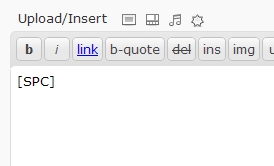
Shortcode example

Form
Pag-install
- Download ‘WP-SimplePasswordChange.zip’.
- Unzip it.
- Upload the folder ‘WP-SimplePasswordChange’ directory to the /wp-content/plugins/ directory.
- Activate the plugin through the ‘Plugins’ menu in WordPress.
- Add the shortcode [SPC] in your page content.
- Optionnaly add url=”http://yourredirection.com” in the shortcode. Ex.: [SPC url=”http://www.disney.com”]
FAQ
- How to use the plugin?
-
Create a new page/post, and add the shortcode [SPC]
- How can I redirect the user to another website?
-
use the url parameter in the shortcode. Ex.: [SPC url=”http://www.disney.com”]
Mga Review
Wala pang reviews para sa plugin na ito.
Mga Contributor at Developer
Ang “wp-simplepasswordchange” ay open source software. Ang mga sumusunod na tao ay nag-ambag sa plugin na ito.
Mga Contributor
Isalin ang “wp-simplepasswordchange” sa iyong wika.
Interesado sa development?
Tingnan ang code, i-check ang SVN repository, o mag-subscribe sa development log sa pamamagitan ng RSS.
Changelog
2010/10/05 – v1.1
- Added url as a parameter of the shortcode
2010/08/25 – v1.0
- Initial release