
Deskripsyon
This plugin is useful when you want to know what date time & timezone is it on server where wordpress is hosted if you are in other timezone.
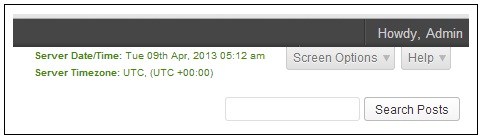
Output looks like:
Server Date/Time: Thu 01st Jan, 2025 11:10 am
Server Timezone: America/Phoenix, (MST -07:00)
Version Change log:
v0.5
Supports upto WordPress 3.7.1
v0.4
Supports upto WordPress 3.6
v0.3
Minimize css code
Supports upto WordPress 3.5.1
v0.2
Added description before date time
Added timezone information
Changed text color from red to green
v0.1
Initial release
Mga Screenshot
Pag-install
- Upload entire
wp-server-date-timedirectory to the/wp-content/plugins/directory - Activate the plugin through the ‘Plugins’ menu in WordPress
- There is no options page, just activate and see the output on right most top corner
FAQ
-
What to do if i run in to any problem
-
Post a comment at http://www.dhruwal.com/wp-server-date-time/
Mga Review
Wala pang reviews para sa plugin na ito.
Mga Contributor at Developer
Ang “WP Server Date Time” ay open source software. Ang mga sumusunod na tao ay nag-ambag sa plugin na ito.
Mga Contributor
Isalin ang “WP Server Date Time” sa iyong wika.
Interesado sa development?
Tingnan ang code, i-check ang SVN repository, o mag-subscribe sa development log sa pamamagitan ng RSS.