
Deskripsyon
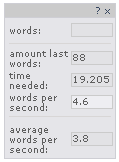
This plugin enables you to have an overview over the amount of words you’re reading on someones blog. It’s a simple, Drag n’ Droppable, easy to install little box with following fields:
- words (words you actually selected)
- amount last words
- time needed (the amount of time needed to read)
- words per second
- average words per second
to change it’s position at start: edit wordcount.css
-top: 50px; -right:5px;
thanks a lot to Peter-Paul Koch for the Drag-Drop script!
that’s it – enjoy!
Mga Screenshot
Pag-install
- Upload the WordCount-files to the
/wp-content/plugins/directory - Activate the plugin through the ‘Plugins’ menu in WordPress
Should work with most themes, as long as wp_footer for hooking exists, that’s all!
Mga Review
Wala pang reviews para sa plugin na ito.
Mga Contributor at Developer
Ang “WordCount” ay open source software. Ang mga sumusunod na tao ay nag-ambag sa plugin na ito.
Mga Contributor
Isalin ang “WordCount” sa iyong wika.
Interesado sa development?
Tingnan ang code, i-check ang SVN repository, o mag-subscribe sa development log sa pamamagitan ng RSS.