
Deskripsyon
Helpful tool displaying name of a (theme) template assigned to a post, page or public custom post type in admin posts list table.
Mga Screenshot
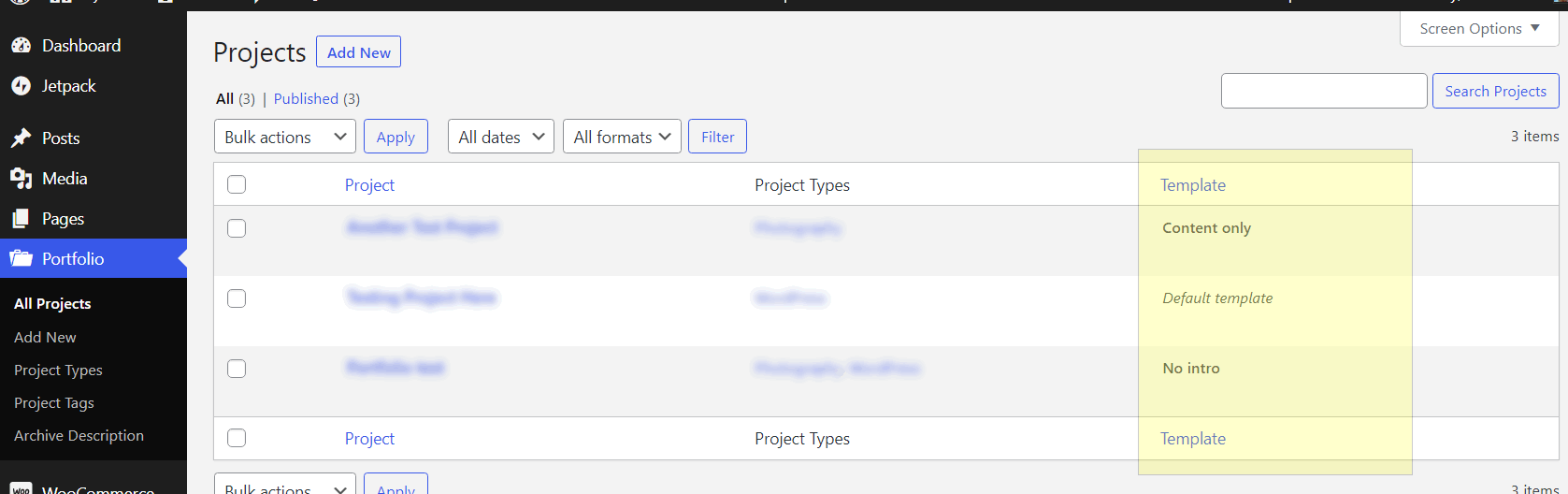
Posts list table with “Template” column. 
Assigning a (theme) template to a page or post.
Pag-install
- Unzip the plugin download file and upload
what-singular-templatefolder into the/wp-content/plugins/directory. - Activate the plugin through the “Plugins” menu in WordPress.
- Plugin works immediately after activation by adding additional column to page/post/custom post type list table in WordPress admin.
FAQ
-
How does it work?
-
Once you enable the plugin, it adds new “Template” column in posts list table in WordPress admin area. Simply navigate to “Posts” or “Pages” admin screen to preview.
Mga Review
Wala pang reviews para sa plugin na ito.
Mga Contributor at Developer
Ang “What Singular Template” ay open source software. Ang mga sumusunod na tao ay nag-ambag sa plugin na ito.
Mga Contributor
Ang “What Singular Template” ay naisalin na sa 2 (na) mga locale. Salamat sa mga tagasalin para sa kanilang mga kontribusyon.
Isalin ang “What Singular Template” sa iyong wika.
Interesado sa development?
Tingnan ang code, i-check ang SVN repository, o mag-subscribe sa development log sa pamamagitan ng RSS.
Changelog
Please see the changelog.md file for details.