
Deskripsyon
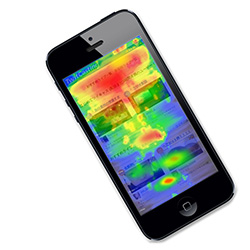
UserHeat is free heatmap analytics plugin to visualize user behavior
both PC and smartphone.
It takes just one step and 30 seconds to start analysis.
The key features of the plugin are:
・3 Heatmap(gaze,click,mouse track) reveals see exactly where your
visitors click on the page, see how much attention a specific area
gets by thermography
・Optimize forms usability to improve submission rates.
・It is available not only for PC but also smartphones and tablet devices.
Visit userheat to learn more.
Mga Screenshot


Pag-install
1, Install plugin
2, Go to UserHeat website and register URL, e-mail, password.
3, Register the issued site ID.
4, Check report after accumulating site access.
FAQ
- Is this a free plugin.
Yes, Is’s a free plugin.

Mga Contributor at Developer
Ang “UserHeat Plugin” ay open source software. Ang mga sumusunod na tao ay nag-ambag sa plugin na ito.
Mga Contributor


Isalin ang “UserHeat Plugin” sa iyong wika.
Interesado sa development?
Tingnan ang code, i-check ang SVN repository, o mag-subscribe sa development log sa pamamagitan ng RSS.
Changelog
1.1.10
- Improvements for enhanced security.
1.1.10
- URLparameter config fix.
1.1.9
- Add URLparameter config.
1.1.8
- Add japanese language.
1.1.7
- It was to expand the description of the management screen.
1.1.6
- Bug fix for admin menu.
1.1.5
- Updated install guide.
1.1.4
- critical bug fix.
1.1.3
- Corresponding to PHP 5.3 -.
1.1.2
- bug fix.
1.1.1
- Corresponding to the English.
1.0.1
- First release.