

Deskripsyon
Tagged Gallery enables you to easily generate a gallery in any post or page based on tagged media.
Useage
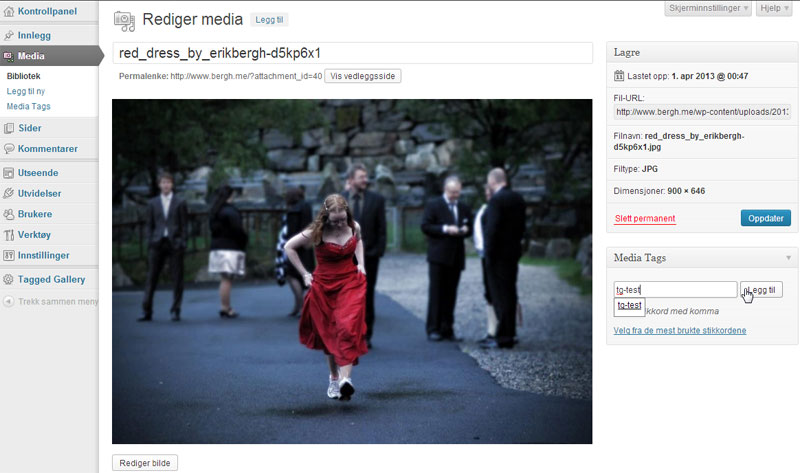
- Tag a image in your media library. For this example we use ‘Spring2013’
- Make a page or a blogpost where you want to display your images and tag that post/page with ‘tg:Spring2013’ and Tagged Gallery will create an image gallery of alle the images tagged with ‘Spring2013’
- Remeber to set thumb size in admin interface 🙂
Dependency
- [Tag Pages] (https://wordpress.org/extend/plugins/tag-pages/ “Tag Pages”) by Bjorn Wijers
- [WordPress Media Tags] (http://www.typomedia.org/wordpress/plugins/wordpress-media-tags/ “WordPress Media Tags”) by Typomedia Foundation
Tagged Gallery does NOT connect to any external servers. Just getting tags and images from your WordPress database
Demo
Click here for a [demo] (http://www.bergh.me/bilder/ “demo”)
0.7
- PHPImagic is completely replaced with jQuery
- New view image feature created in jQuery. That now fit to screen.
- Support for mobile screen rotation. Image resizes to fit window resize
Initial upload
Todo
- Next/previous function
- user defined CSS
- Lose pendency to Tag Pages and WordPress Media Tags
Version Log
0.7
- PHPImagic is completely replaced with jQuery
- New view image feature created in jQuery. That now fit to screen.
- Support for mobile screen rotation. Image resizes to fit window resize
0.6.1
Bugfix – in 0.6 i added the jQuery and forgot to add the values from Tagged Gallery settings.
0.6
Thumbs are now generated by jQuery and not phpimagick
0.5
Mga Screenshot




Pag-install
Easiest installation
- In wordpress admin go to Plugins -> Add plugin
- Search for “tagged gallery” and add
- Set thumb size in Tagged Gallery settings
Alternative installation
- Upload the
tagged-galleryfolder to the/wp-content/plugins/directory - Activate the plugin through the ‘Plugins’ menu in WordPress
- Set thumb size in Tagged Gallery settings
FAQ
- Does Tagged Gallery use WordPress thumbs or does it make its own?
-
Tagged Gallery make its own thumbs.
- Does Tagged Gallery support Lightbox or jQuery-plugins like that?
-
Tagged Gallery har its own lightbox feature called tgbox.
Mga Review
Wala pang reviews para sa plugin na ito.
Mga Contributor at Developer
Ang “Tagged Gallery” ay open source software. Ang mga sumusunod na tao ay nag-ambag sa plugin na ito.
Mga Contributor
Isalin ang “Tagged Gallery” sa iyong wika.
Interesado sa development?
Tingnan ang code, i-check ang SVN repository, o mag-subscribe sa development log sa pamamagitan ng RSS.