

Deskripsyon
Seory Posts to Markdown converts your site content into clean Markdown files and bundles them into a single ZIP archive — ready to hand to AI tools, static site generators, or any Markdown-based workflow.
Everything runs on your server. No data is sent to external services, no API keys, no accounts.
Features
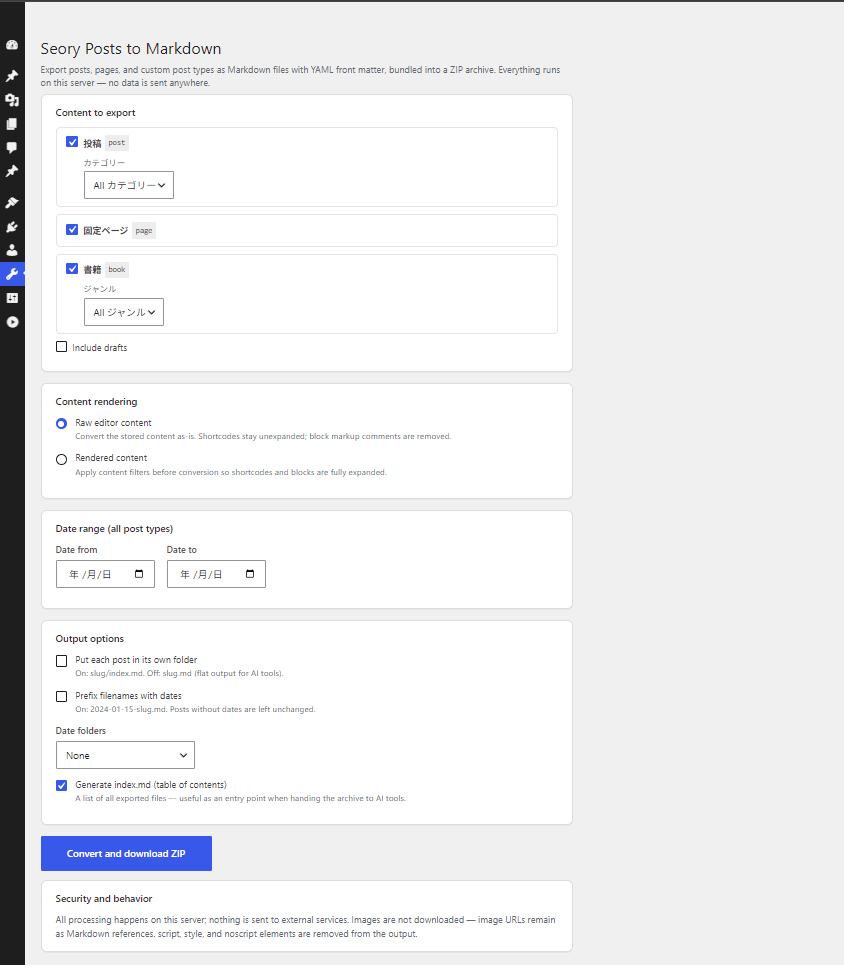
- Export posts, pages, and public custom post types in one click
- YAML front matter: title, date, type, status, slug, link, author, featured image, categories, tags, custom taxonomy terms, draft flag
- Two content modes: raw editor content, or fully rendered content with shortcodes and blocks expanded (
the_contentfilters applied) - Per-post-type taxonomy filters (categories, custom taxonomies) plus a global date range; optionally include drafts
- Flexible output layout: flat files (
slug.md), per-post folders (slug/index.md), date prefixes (2024-01-15-slug.md), and year / year-month folders - Optional
index.mdtable of contents — a convenient entry point when handing the archive to AI tools - GFM tables, fenced code blocks, ATX headings
- Batch processing keeps large sites within PHP time limits
What it does not do
- Images are not downloaded; image URLs remain as Markdown references
script,style, andnoscriptelements are removed from the output
Related
A browser-based version (convert a WordPress export XML without installing anything) is available at tools.seory.co.jp/wp-to-markdown.
Mga Screenshot
Pag-install
- Install and activate the plugin.
- Go to Tools Seory Posts to Markdown.
- Choose post types and output options, then click Convert and download ZIP.
FAQ
-
Is my content sent anywhere?
-
No. Conversion runs entirely on your own server, and the generated ZIP is deleted right after download.
-
What is the difference between the two content modes?
-
Raw editor content converts the stored post content as-is: shortcodes stay unexpanded and block markup comments are removed. Rendered content applies the
the_contentfilters first, so shortcodes and blocks are expanded to their final HTML before conversion. -
Which user roles can use it?
-
Users with the
exportcapability (administrators by default). -
Are custom post types supported?
-
Yes — all public custom post types appear in the post type list.
-
Can I customize the front matter?
-
Yes. Developers can add, remove, or reorder keys with the
seoryco_wpmd_frontmatterfilter:add_filter( 'seoryco_wpmd_frontmatter', function ( $pairs, $post ) { $pairs['subtitle'] = '"' . get_post_meta( $post->ID, 'subtitle', true ) . '"'; return $pairs; }, 10, 2 );Values must be YAML-formatted; keys with an empty-string value are omitted.
Mga Review
Wala pang reviews para sa plugin na ito.
Mga Contributor at Developer
Ang “Seory Posts to Markdown” ay open source software. Ang mga sumusunod na tao ay nag-ambag sa plugin na ito.
Mga Contributor
Ang “Seory Posts to Markdown” ay naisalin na sa 1 (na) locale. Salamat sa mga tagasalin para sa kanilang mga kontribusyon.
Isalin ang “Seory Posts to Markdown” sa iyong wika.
Interesado sa development?
Tingnan ang code, i-check ang SVN repository, o mag-subscribe sa development log sa pamamagitan ng RSS.
Changelog
0.1
- Initial release.