

Deskripsyon
Proofreading plugin allows you to improve the quality of your posts, pages and all your WordPress website.
It gives you the possibility to check the correction of the texts inserted into posts, pages and drafts in less than a second!
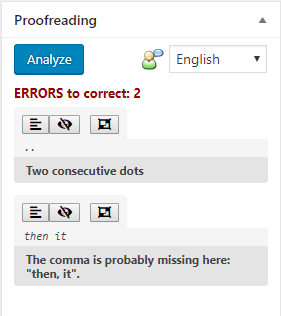
Press the “Analyze” button and you will have a list of all found errors.
The plugin allows to recognize different types of text errors (thanks to Languagetool.org). Here some examples of error types:
* Typos
* Punctuation
* Typography
* Commonly Confused Words
* Nonstandard phrases
* Semantic
* Grammar
* Redundant Phrases
Proofreading plugin supports a lot of languages. For example:
* English
* Spanish
* German
* Italian
* Japanese
* French
* Portuguese
* Russian
* and so on…
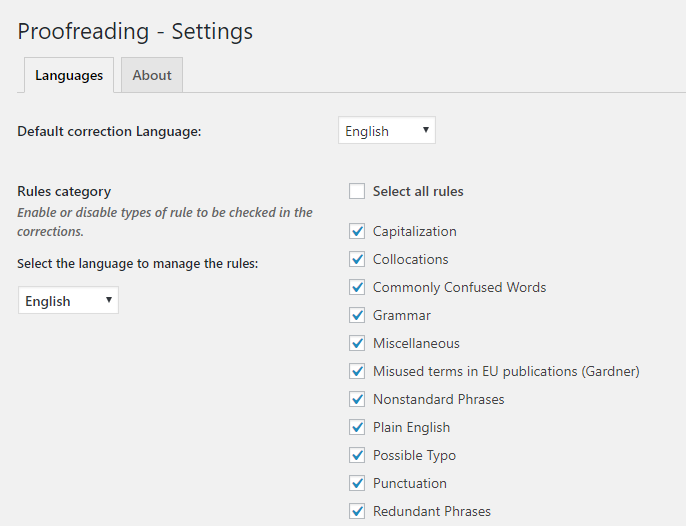
For every language, in the settings page, you can customize which are the error categories you are interesting, hiding the others.
Mga Screenshot


Pag-install
From your WordPress dashboard
- Visit ‘Plugins > Add New’
- Search for ‘Proofreading’
- Activate the plugin from your Plugins page.
From WordPress.org
- Download Proofreading zip file
- Unzip it
- Upload the unzipped directory to your ‘/wp-content/plugins/’ directory
- Activate the plugin from your Plugins page.
After installation the plugin select your WordPress installation language as default language for the plugin. If you want to change it, go to the settings page.
Mga Review


Mga Contributor at Developer
Ang “Proofreading” ay open source software. Ang mga sumusunod na tao ay nag-ambag sa plugin na ito.
Mga Contributor
Ang “Proofreading” ay naisalin na sa 2 (na) mga locale. Salamat sa mga tagasalin para sa kanilang mga kontribusyon.
Isalin ang “Proofreading” sa iyong wika.
Interesado sa development?
Tingnan ang code, i-check ang SVN repository, o mag-subscribe sa development log sa pamamagitan ng RSS.
Changelog
1.2.2
- Escaping improved
- Code refactoring
- Placeholder for translators
- WordPress 6.7.1 compatibility (not Gutenberg)
1.2.1
- Security fixes
- Added prepare statements to queries
1.2
- Security fixes
- Changed escaping data methods
- WordPress 6.4.3 compatibility (not Gutenberg)
1.1
- WordPress 6.3.2 compatibility (not Gutenberg)
- URLs escaped
- Translations escaped
- Corrected URLs for multisite installations
1.0.11
- WordPress 5.8 compatibility (not Gutenberg)
- Restyling of about page
1.0.10
- WordPress 5.7 compatibility (not Gutenberg)
- Classic editor link corrected
1.0.9
- Enabled proofreading services for all post types
- Plugin webpage changed
- Minor changes
1.0.8
- WordPress 5.6 compatibility (not Gutenberg)
- Speed improvement (JS/CSS file loading)
- Font Awesome icons replaced by Dashicons
- Minor changes
1.0.7
- WordPress 5.3 compatibility (not Gutenberg)
- Code and documentation improvements
- Minor changes
1.0.6
- WordPress 5.2 compatibility (not Gutenberg)
- Graphical changes
1.0.5
- Security improvements
- Graphical changes
- Paragraph selection corrected
- Removed jQuery $ alias use
1.0.x
- Minor changes and bugfixes
1.0
- First plugin version