

Deskripsyon
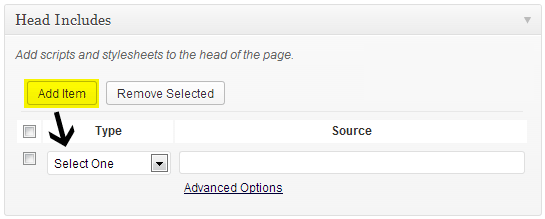
Easily add scripts and stylesheets per post. This is a great tool for developers creating custom pages for their clients, but also useful for the blogger who wants to separate inline CSS & JS from their post content.
This plugin provides an interface for wp_enqueue_script and wp_enqueue_style functions, so all of the functionality that a developer would find there is available in this plugin.
However, script localization differs from wp_localize_script in that with this plugin you are allowed to input raw JavaScript code for localization, library initialization, and more.
This plugin may also help to alleviate modern browser XSS detection from blocking potentially unsafe JavaScript.
Mga Screenshot


Pag-install
- Upload files to the
/wp-content/plugins/directory - Activate the plugin through the ‘Plugins’ menu in WordPress
- Create a new post or page
- Configure your post head includes in the meta box below the editor
FAQ
- Where are my scripts and stylesheets?
-
They will be added to the HEAD area of the page or post.
- Can I have more than one script or stylesheet?
-
Yes, you can add as many as you’d like or need.
- Can I add my scripts to the footer for faster loading?
-
Yes, under the Advanced Options you can set
In Footertotrue. - My included script needs to be initialized. How can I do this?
-
Under
Advanced Optionsyou can add any custom JavaScript to theLocalizationtext area. This will be added after your JS file. - How to conditions work?
-
When adding a condition, you need only to write the expression, and not the entire comment tag. For example, to load the item only for IE browsers at version 9, you would write
if IE 9. Note: Adding a condition will force the item to be included at the end of the element (after all other scripts and stylesheets). Therefore, specifying dependencies will have no effect.
Mga Review
Wala pang reviews para sa plugin na ito.
Mga Contributor at Developer
Ang “Post Head Includes” ay open source software. Ang mga sumusunod na tao ay nag-ambag sa plugin na ito.
Mga Contributor
Isalin ang “Post Head Includes” sa iyong wika.
Interesado sa development?
Tingnan ang code, i-check ang SVN repository, o mag-subscribe sa development log sa pamamagitan ng RSS.
Changelog
0.2.1 – Fixed inconsistent post ID management on save.
0.2.0 – Added support for IE conditional tags; minor code cleanup.
0.1.0 – First release.