
Deskripsyon
Keep your media insert code consistent site-wide.
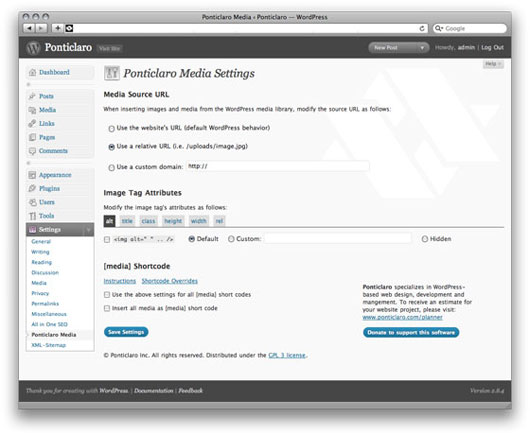
- Customize image and media HTML code site-wide
- Use the [media] shortcode to display images from the gallery at particular sizes
- Remove overbearing WordPress auto-code like class=””
- Force WordPress to insert relative URLs to make testing on a dev server easier
Shortcode Documentation
Use the [media] shortcode to easily display images from the gallery. Here are some example uses:
Display 3 images from the gallery. The order is determined in the WordPress media gallery:
[media] [media] [media]
Display an image with id 123:
[media id=”123″]
Display a thumbnail, medium, or large sized image:
[media size=”small”]
[media size=”medium”]
[media size=”large”]
Display a clickable image. The click through URL will default to the WordPress “view page” for that image.
[media link=true]
Display a clickable image, linking to an arbitrary URL:
[media link=true url=”http://www.your-custom.url”]
Examples for setting custom class, title, width, or height attributes. These can be used to customzie the attributes on the generated HTML image tag
[media class=”custom-class” title=”title text” width=”100″ height=”100″]
Mga Screenshot
Pag-install
- Upload the entire folder “ponticlaro-media-settings” to your plugin’s directory.
- Activate the plugin.
- Click “Ponticlaro Media” under the “Settings” menu to configure the plugin.
Mga Review
Wala pang reviews para sa plugin na ito.
Mga Contributor at Developer
Ang “Ponticlaro Media Settings” ay open source software. Ang mga sumusunod na tao ay nag-ambag sa plugin na ito.
Mga Contributor

Isalin ang “Ponticlaro Media Settings” sa iyong wika.
Interesado sa development?
Tingnan ang code, i-check ang SVN repository, o mag-subscribe sa development log sa pamamagitan ng RSS.
Changelog
- Version 1.0: Initial release
- Version 1.1: PHP4 compatibility
- Version 1.2: Minor bug fix
- Version 1.3: Fix shortcode bug
- Version 1.4: Fix issue with RSS feeds