
Deskripsyon
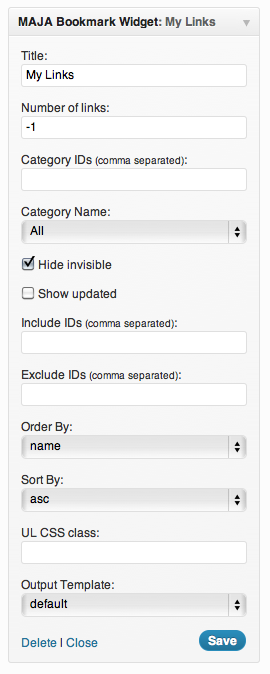
The Maja Bookmarks plug-in is a widget as well as a shortcode to display a list of bookmarks (links) through several options. Includes widget options and the equivalent shortcode to configure the features mentioned below. It follows the WordPress standard widgets output guidelines. Completely updated to use the new widget API and is multi-widget enabled. Fully XHTML compliant.
Features:
- Can display links by category or multi categories.
- Can include/exclude specific link id.
- Can limit the number of links.
- Can show links that match a search keyword criteria.
- Can show/hide invisible links.
- Can order by several criteria.
- Can choose a custom css selector for the ul list.
- Can add custom output templates as well as choose a custom html tag container.
- All widget parameters can be used in the shorcode tag.
Shortcode default parameters
- [majabookmarks
- limit=”5″
- order=”ASC”
- orderby=”name”
- category_name=”All”
- category=””
- hide_invisible=”1″
- show_updated=”0″
- include=””
- exclude=””
- search=””
- use_css=””
- use_hook=””]
Custom Template
- Create a new folder inside your theme folder, name it ‘maja-bookmarks’
- Create an empty php file inside it.
- Write your html/php code to display one item of the list.
- Use the $bookmark object to print out its properties.
Available fields in bookmark object
- ‘link_id’
- ‘link_url’
- ‘link_name’
- ‘link_image’
- ‘link_target’
- ‘link_category’
- ‘link_description’
- ‘link_visible’
- ‘link_owner’
- ‘link_rating’
- ‘link_updated’
- ‘link_rel’
- ‘link_notes’
- ‘link_rss’
Mga Screenshot
Pag-install
- Download the Maja Bookmarks zip file.
- Extract the files to your WordPress plugins directory.
- Activate the plugin via the WordPress Plugins tab.
- Configure the widget and place it on your blog using the Widget configuration page.
- Alternatively you can use the ‘majabookmarks’ shortcode tag alongside the same widget parameters in body posts/pages.
FAQ
- What if I have further questions?
-
If you have any questions or comments, feel free to leave a comment on the project page and I will respond as soon as I can.
Mga Review
Wala pang reviews para sa plugin na ito.
Mga Contributor at Developer
Ang “Maja Bookmarks” ay open source software. Ang mga sumusunod na tao ay nag-ambag sa plugin na ito.
Mga Contributor
Isalin ang “Maja Bookmarks” sa iyong wika.
Interesado sa development?
Tingnan ang code, i-check ang SVN repository, o mag-subscribe sa development log sa pamamagitan ng RSS.
Changelog
1.1.5.1
- minor bug fix
1.1.5
- just some refactoring
1.1.4
- fixed some typo in the documentation
1.1.3
- minor update
1.1.2
- minor update
1.1.1
- minor update
1.1
- added link target to the output list
- added new powerful feature to create custom output templates
1.0
Initial release.