

Deskripsyon
Add iPhone photos to WordPress without the hassle. HEIC Support lets you upload .heic and .heif images to the Media Library and automatically creates web-friendly .webp, .avif, or .jpg copies, so your photos actually display in every browser.
Free forever, and it just works
The plugin is free and works on thousands of sites with no account, no key, and no limits. Most WordPress hosts already run ImageMagick 7 with libheif, which is all that is needed to convert .heic locally. After activating, open Settings Media HEIC Support to see a live test conversion for your own server.
- Allows .heic and .heif uploads to the Media Library
- Automatically creates a .webp, .avif, or .jpg copy of every .heic upload
- Optionally replaces the original upload instead of keeping a copy
- Choose your output format: .avif (smallest files), .webp (smaller files), or .jpg (most compatible)
- No configuration required. Just activate and upload
Host can’t convert? Convert on any server (optional, paid)
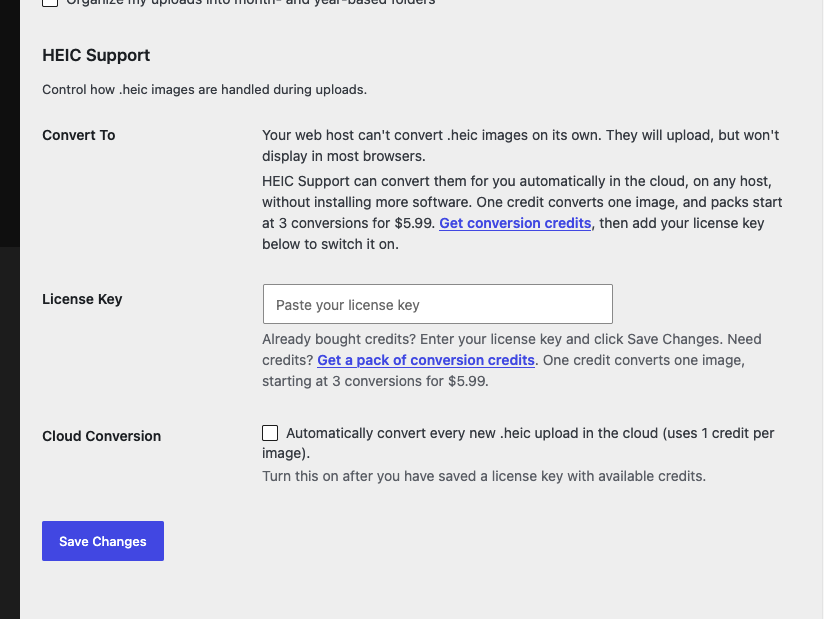
Some budget or locked-down hosts don’t include the libraries needed to read .heic. If the test at Settings Media shows your server can’t convert on its own, HEIC Support can hand the job to our cloud conversion service, so your uploads still get a .webp, .avif, or .jpg copy on any host, without installing more software.
Cloud conversion is entirely optional and opt-in. You only need it if your server can’t convert locally. Buy a pack of conversion credits, paste your license key at Settings Media, and switch it on. One credit converts one image, and packs start at 3 conversions for $5.99. Get conversion credits.
The free plugin always works for free whenever your server can convert. Cloud conversion never runs unless you buy credits, save a key, and turn it on.
Mga Screenshot

Pag-install
- Upload the entire
heic-supportfolder to the/wp-content/plugins/directory. - Activate the plugin through the Plugins screen (Plugins Installed Plugins).
Check the page at Settings Media after activating to see if your server provides ImageMagick 7.
External services
This plugin’s optional, opt-in cloud conversion feature connects to an external service operated by Breakfast (breakfastco.xyz). With no license key saved, the plugin does not contact any external service.
Credit balance checks. After you save a license key at Settings Media, the plugin may contact breakfastco.xyz to fetch your remaining conversion credit balance. This request is made when the settings page is displayed (and the result is cached for about 10 minutes) so the plugin can show how many credits you have left. It sends your license key and your site URL. This happens even if “Cloud Conversion” is not yet enabled.
Cloud conversion. When you have saved a license key and enabled “Cloud Conversion” at Settings Media, the plugin sends your license key and your site URL to breakfastco.xyz to reserve conversion credits and perform a conversion. The plugin uploads the .heic image file to the conversion server, which returns the converted .webp, .avif, or .jpg image. Uploaded images are processed in memory and the temporary files are deleted immediately after conversion; they are not stored or shared.
Use of the cloud conversion service is governed by the Breakfast Privacy Policy (https://breakfastco.xyz/privacy-policy/).
Mga Review


Mga Contributor at Developer
Ang “HEIC Support” ay open source software. Ang mga sumusunod na tao ay nag-ambag sa plugin na ito.
Mga Contributor
Ang “HEIC Support” ay naisalin na sa 6 (na) mga locale. Salamat sa mga tagasalin para sa kanilang mga kontribusyon.
Isalin ang “HEIC Support” sa iyong wika.
Interesado sa development?
Tingnan ang code, i-check ang SVN repository, o mag-subscribe sa development log sa pamamagitan ng RSS.
Changelog
2.3.0
- [Added] Adds .avif as an output format option alongside .webp and .jpg.
- [Added] Shows a dismissible warning right in the uploader when a .heic is added on a server that cannot convert locally and does not have cloud conversion set up, so the upload no longer fails silently.
- [Removed] Removes admin notices from the dashboard; feedback now appears in the uploader instead.
2.2.1
- [Fixed] Shows a dismissible notice after a .heic is uploaded on a server that cannot convert locally and does not have cloud conversion set up, so the upload no longer fails silently.
- [Changed] Adds a link to the Privacy Policy in the external services disclosure.
2.2.0
- [Added] Optional, opt-in cloud conversion for servers without ImageMagick/libheif. Enter a license key and enable it at Settings Media; converts .heic uploads via the Breakfast cloud conversion service using purchased credits. See the External services section.
- [Changed] Changes the tested up to version to 7.0.
2.1.4
- [Fixed] Makes sure the test runs before the settings output is generated.
- [Changed] Changes the tested up to version to 6.8.3.
2.1.3
- [Changed] Changes the tested up to version to 6.6.2.
2.1.2
- [Fixed] Shows better error output when ImageMagick is installed on the server but conversions cannot be completed.
- [Fixed] Uses a unique file name when creating test images in the uploads folder.
- [Changed] Changes the tested up to version to 6.4.0.
2.1.1
- [Added] Adds a screenshot of the plugin settings.
- [Fixed] Fixes a bug in the replace feature that prevented it from working in certain environments. See https://wordpress.org/support/topic/replace-does-not-work-because-of-file-type/
- [Changed] Changes the tested up to version to 6.3.2.
2.1.0
- [Added] Adds .jpg support. Adds a setting to toggle whether images are converted to webp or jpg. Defaults to webp.
- [Added] Show the settings section at Settings Media even if ImageMagick is not installed. Explain to users that their host does not provide the library.
- [Fixed] Removes layers from the icon .svg file.
- [Changed] Changes the tested up to version to 6.3.1.
2.0.0
- [Added] Add filters around the webp format and image/webp mime type strings so they can be changed by other developers.
- [Added] Adds an optional feature to replace .heic images rather than create a copy. A switch enables the feature at Settings Media.
- [Fixed] Updates an error message to stop mentioning a specific minimum version of ImageMagick. It was not accurate, and other dependencies like libheif could be missing that prevent conversions from working.
- [Changed] Moves all plugin settings from Media HEIC Support to Settings Media.
- [Changed] Changes the tested up to version to 6.2.0.
- [Removed] Removes the menu at Media HEIC Support.
1.0.1
- [Fixed] Fixes a bug that caused a parse error in PHP versions less than or equal to 7.2.
- [Changed] Changes the tested up to version to 6.1.1.
1.0.0
- [Added] First public version. Adds
.heicsupport to WordPress. If ImageMagick 7 or above is installed, creates.webpcopies of.heicimages uploaded to the Media Library.