

Deskripsyon
✨ Add meta tags to your site
✨ Blazing fast performance
✨ Uses only 60KB of code!
Head Meta Data (HMD) improves the definition and semantic quality of your website by adding <meta> tags to the <head> section of your web pages. Super lightweight, fast, and user-friendly.
🤖 Default Meta Tags
Customize the perfect set of meta tags for your site. For example:
<head>

    <meta charset="utf-8">
    <meta name="abstract" content="Obsessive Web Development">
    <meta name="author" content="Jeff Starr (aka Perishable)">
    <meta name="classification" content="Website Development">
    <meta name="copyright" content="Copyright Perishable Press">
    <meta name="description" content="Web Development Tutorials">
    <meta name="designer" content="Jeff Starr @ Monzilla Media">
    <meta name="distribution" content="Global">
    <meta name="keywords" content="Web, WordPress, Tutorials">
    <meta name="language" content="en">
    <meta name="publisher" content="Perishable Press">
    <meta name="rating" content="General">
    <meta name="resource-type" content="Document">
    <meta name="revisit-after" content="3">
    <meta name="subject" content="Web Dev + WordPress + Security">
    <meta name="template" content="shapeSpace WordPress Theme">
    <meta name="robots" content="index,follow">

    <!-- plus you can add your own custom tags! -->

</head>
🤖 Dynamic Meta Tags
Use shortcodes to dynamically output SEO meta tags:
<title>[hmd_post_title] | My Awesome Website</title>
<meta name="description" content="[hmd_post_excerpt]">
This outputs dynamic titles and descriptions, useful for SEO. You also can add unique meta tags and markup on specific posts and pages. Check out the Installation tab for more information.
✨ Help bots understand your content better
🤖 Features
- Simple and easy to use
- Clean, standards-based code
- Customize all
<meta>tags - Add your own custom
<meta>tags - Add custom meta tags on any post or page
- Supports X (Twitter) Cards and Facebook Open Graph tags
- Supports
<meta>,<link>,<base>,<title>, and<style> - Automatically adds tags to the
<head>section of all pages - Check out a Live Preview of your meta tags and custom tags
- Auto-populates tags using your site’s information
- Use shortcodes to include dynamic information
- Easily disable any unwanted tags
- Lightweight, fast, and secure
✨ Check out Head Meta Pro to define tags for each page view
🤖 Shortcodes
Shortcodes enable you to include dynamic bits of information in your meta tags. Head Meta Data provides the following shortcodes:
[hmd_post_excerpt]  Outputs post excerpt
[hmd_post_date]     Outputs post date
[hmd_post_author]   Outputs post author
[hmd_post_title]    Outputs post title
[hmd_post_cats]     Outputs post categories
[hmd_post_tags]     Outputs post tags
[hmd_site_tagline]  Outputs site tagline
[hmd_site_title]    Outputs site title
[hmd_year]          Outputs current year
[hmd_tab]           Outputs tab space to tag markup
So you can display your own set of custom meta tags exactly as desired. Learn more »
🤖 Pro Features
The Pro version can do everything the free version can do, PLUS:
- Define meta tags for Custom Post Types
- Define meta tags for each type of page-view (e.g., home, posts, pages, archive, search)
- Define tags for Facebook (Open Graph)
- Define tags for X (Twitter)
- Define Facebook and X tags for each type of page view
- 40+ advanced shortcut variables like
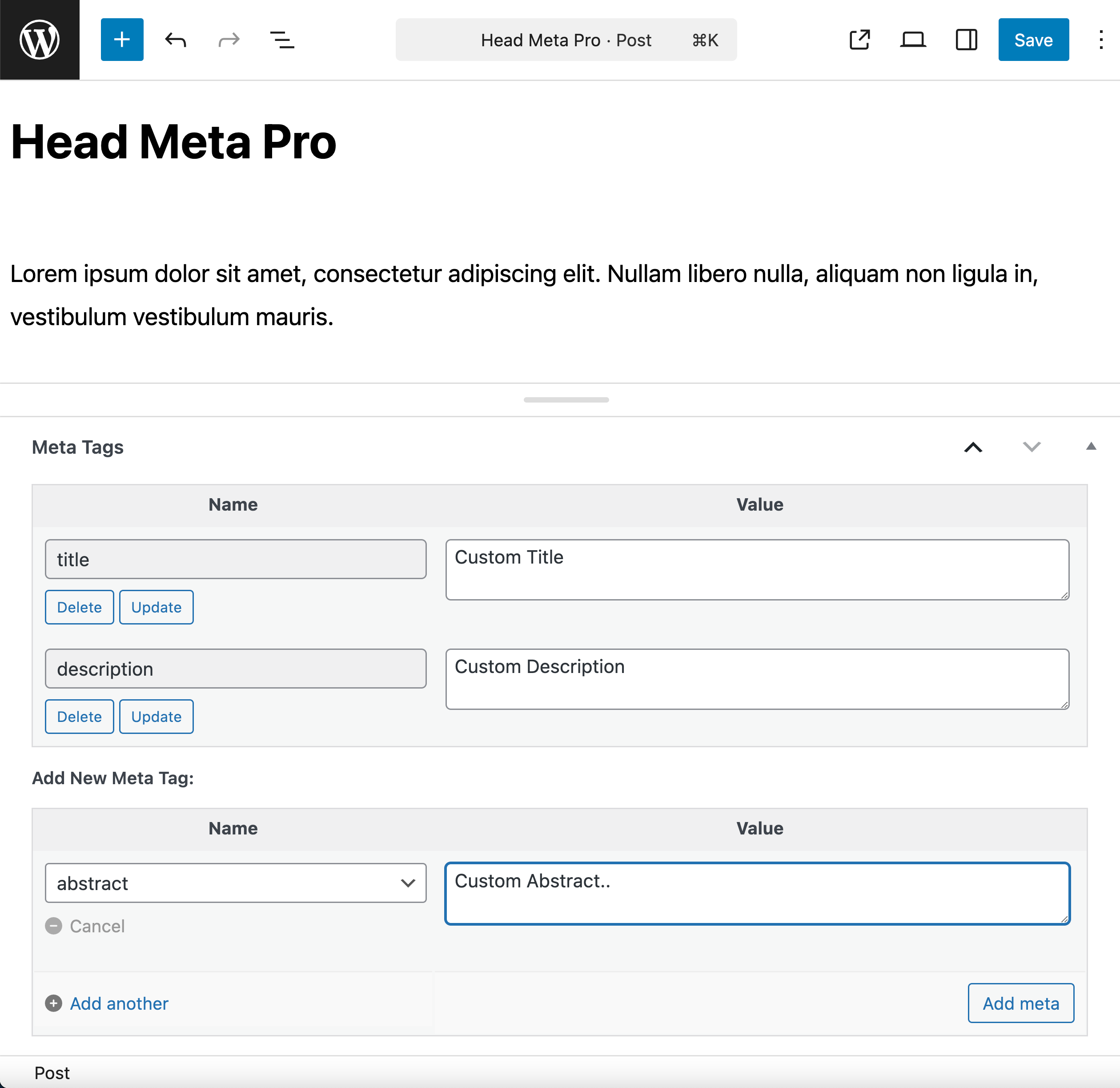
%POST_AUTHOR%and%ARCHIVE_TYPE% - Dedicated “Meta Tags” meta box for posts and pages
- Add custom meta tags to any post or page-view
- Add custom script and style to any post or page-view
- Meta Tags box integrates with SEO plugins
- Additional meta tags beyond the free version
- Dedicated setting for
image_srclink tag - Premium support for pro purchases
✨ Level up your meta tags with Head Meta Pro »
🤖 Privacy
This plugin does not collect or store any user data. It does not set any cookies, and it does not connect to any third-party locations. Thus, this plugin does not affect user privacy in any way.
Head Meta Data is developed and maintained by Jeff Starr, 15-year WordPress developer and book author.
🤖 Support Development
I develop and maintain this free plugin with love for the WordPress community. To show support, you can make a donation or purchase one of my books:
- The Tao of WordPress
- Digging into WordPress
- .htaccess made easy
- WordPress Themes In Depth
- Wizard’s SQL Recipes for WordPress
And/or purchase one of my premium WordPress plugins:
- BBQ Pro – Blazing fast WordPress firewall
- Blackhole Pro – Automatically block bad bots
- Banhammer Pro – Monitor traffic and ban the bad guys
- GA Google Analytics Pro – Connect WordPress to Google Analytics
- Head Meta Pro – Ultimate Meta Tags for WordPress
- REST Pro Tools – Awesome tools for managing the WP REST API
- Simple Ajax Chat Pro – Unlimited chat rooms
- USP Pro – Unlimited front-end forms
Links, tweets and likes also appreciated. Thanks! 🙂
Mga Screenshot

Pag-install
🤖 Installation
- Upload the plugin to your blog and activate
- Visit the settings to configure your options
More info on installing WP plugins
🤖 Shortcodes
Shortcodes enable you to include dynamic bits of information in your meta tags. Head Meta Data provides the following shortcodes:
Single post views

[hmd_post_excerpt]  Outputs post excerpt
[hmd_post_date]     Outputs post date
[hmd_post_author]   Outputs post author
[hmd_post_title]    Outputs post title
[hmd_post_cats]     Outputs post categories
[hmd_post_tags]     Outputs post tags
[hmd_site_tagline]  Outputs site tagline
[hmd_site_title]    Outputs site title
[hmd_year]          Outputs current year
[hmd_tab]           Outputs tab space to tag markup
You can include any of these shortcodes in the “Custom Tags” setting, and the displayed information will reflect the current post being viewed. On non-single page views, like the homepage, archives, and search results, the shortcodes display general information:
Non-single views

[hmd_post_excerpt]  Outputs site description
[hmd_post_date]     Outputs date of latest post
[hmd_post_author]   Outputs site name
[hmd_post_title]    Outputs site description
[hmd_post_cats]     Outputs all view categories
[hmd_post_tags]     Outputs all view tags
[hmd_site_tagline]  Outputs site tagline
[hmd_site_title]    Outputs site title
[hmd_year]          Outputs current year
[hmd_tab]           Outputs tab space to tag markup
✨ Note: Many more shortcut variables available in the Pro version »
You can add custom tags via the “Custom Tags” setting, for example:
<meta name="date" content="[hmd_post_date]">
<meta name="abstract" content="[hmd_post_title]">
<meta name="author" content="[hmd_post_author]">
<meta name="copyright" content="Copyright [hmd_year] Awesome Website">
Another example using shortcodes to output meta tags dynamically:
<title>[hmd_post_title] | My Awesome Website</title>
<meta name="description" content="[hmd_post_excerpt]">
That will output dynamic titles and descriptions according to the current post or page view. Very useful for SEO and helping bots to understand your content better.
✨ Feedback and ideas welcome! Reach us anytime via our contact form »
🤖 Custom Meta Tags
To add custom meta tags to the <head> section of any specific post or page:
- Visit the “Edit Post” or “Edit Page” screen
- Open the “Custom Fields” meta box
- Add a new custom field
- For the custom field Name, enter
head-meta-data - For the custom field Value, enter desired tag/markup
- Save changes and done.
You can add as many custom meta tags as desired, no limits.
For example, we could add the following custom <link> tag to any post:
<link rel="icon" type="image/png" href="/android.png" sizes="192x192">
After saving changes that exact code will be included in the post’s <head> section.
You can also use shortcodes in custom meta tags, for example:
<meta name="description" content="[hmd_post_excerpt]">
That will output the post excerpt on single post views, and the site description on archive and home views.
Tip: You can include tab spaces in the custom field value, for example:
<meta name="description" content="[hmd_post_excerpt]">
Useful for indenting code to align with other meta tags 😉
Tip: By default, any custom tags are displayed after the default meta tags.
Tip: To disable all of the default meta tags on any post, add a new custom field with the name hmd_disable_default. Give it a value of 1. Save changes and done.
✨ Note: The Pro version provides a Meta Tags Box for adding tags to posts and pages
🤖 Upgrades
Visit the WordPress Plugins screen, locate the plugin, and click “Update” 🙂
🤖 Restore Default Options
To restore default plugin options, either uninstall/reinstall the plugin, or visit the plugin settings > Restore Default Options.
🤖 Like the Plugin?
If you like Head Meta Data, please take a moment to give a 5-star rating. It helps to keep development and support going strong. Thank you!
🤖 Uninstalling
This plugin cleans up after itself. All plugin settings will be removed from the WordPress database when the plugin is deleted via the WP Plugins screen. Any custom fields will NOT be removed.
FAQ
To ask a question, suggest a feature, or provide feedback, contact me directly.
Mga Review


Mga Contributor at Developer
Ang “Head Meta Data” ay open source software. Ang mga sumusunod na tao ay nag-ambag sa plugin na ito.
Mga Contributor
Ang “Head Meta Data” ay naisalin na sa 2 (na) mga locale. Salamat sa mga tagasalin para sa kanilang mga kontribusyon.
Isalin ang “Head Meta Data” sa iyong wika.
Interesado sa development?
Tingnan ang code, i-check ang SVN repository, o mag-subscribe sa development log sa pamamagitan ng RSS.
Changelog
If you like Head Meta Data, please take a moment to give a 5-star rating. It helps to keep development and support going strong. Thank you!
🤖 Get Head Meta Pro to dial in perfect tags for each page view, social media, and more.
20260810
- Updates plugin settings page
- Tests on WordPress 7.1
20260421
- Fixes bug with reset options
- Updates plugin settings page
- Improves readme.txt documentation
- Tests on WordPress 7.0
Full changelog @ https://plugin-planet.com/wp/changelog/head-meta-data.txt