

Deskripsyon
- Activating this plugin will create a ‘Easy Admin’ entry in your admin area.
- Click it to go to the settings page.
- Simply select the menu entry you want to hide.
- Save your settings, and you’re done !
Of course, the Easy Admin settings page is always available, so you can always go back and show menu items you need.
If you have any questions, contact me via my website at https://vincentdubroeucq.com
Mga Screenshot
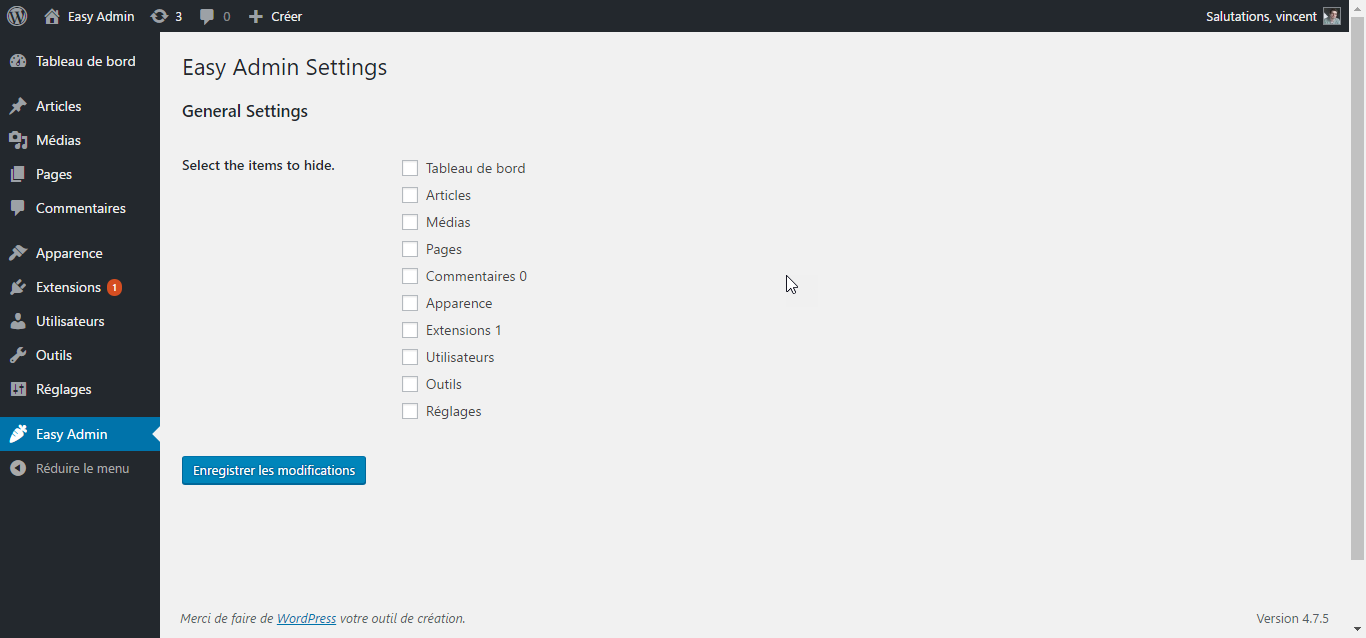


Pag-install
- Download the zip file and unzip it.
- Upload the plugin folder to the
/wp-content/plugins/directory, or install the plugin through the WordPress plugins screen directly. - Activate the plugin through the ‘Plugins’ screen in WordPress
- That’s it ! Go to the settings page and clean your admin menu !
FAQ
- Does Easy Admin offer granular control over sub-items ?
-
No. Else it won’t be ‘Easy’ anymore. Not yet. But why not later ?
Mga Review
Wala pang reviews para sa plugin na ito.
Mga Contributor at Developer
Ang “Easy Admin” ay open source software. Ang mga sumusunod na tao ay nag-ambag sa plugin na ito.
Mga Contributor
Isalin ang “Easy Admin” sa iyong wika.
Interesado sa development?
Tingnan ang code, i-check ang SVN repository, o mag-subscribe sa development log sa pamamagitan ng RSS.
Changelog
1.0.3
- Tested with WordPress 5.3.2.
1.0.2
- Tested with WordPress 5.0.1.
1.0.1
- Fixed compatibility issue with older versions of PHP.
1.0.0
- Initial release.