

Deskripsyon
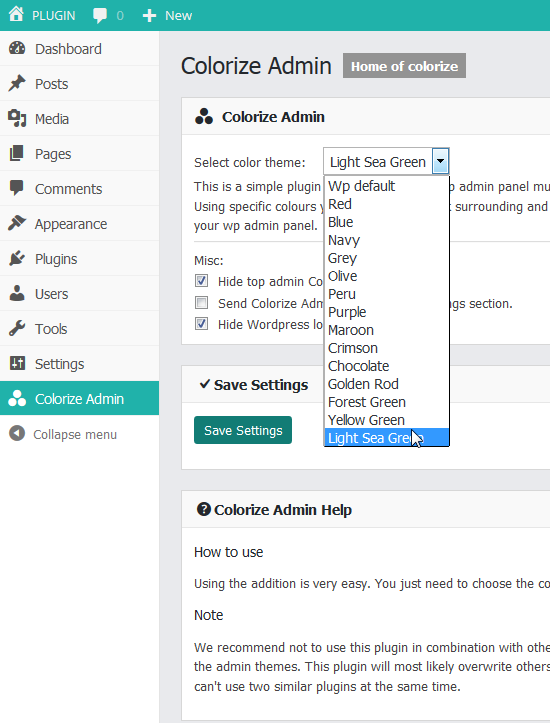
This is a simple plugin that will make your wp admin panel theme much more pleasant for work. Using specific colours you improve your work surrounding and simple and clean design of your wp admin panel.
- 30 color themes.
- Tested with other popular plugins.
- last update 8/5/2019
Video:
https://www.youtube.com/watch?v=usB0PPeEczw
Mga Screenshot
Pag-install
Here is the instruction:
- First download wpvote-colorize-admin.zip.
- Upload the “wpvote-colorize-admin.zip” from your admin panel.
- Then activate the plugin.
- Then go to your “Colorize Admin” and manage plugin.
FAQ
- How to use
-
Using the addition is very easy. You just need to choose the colour you like and that’s it.
- Note
-
We recommend not to use this plugin in combination with other similar plugins which change the admin themes. This plugin will most likely overwrite others or will be overwritten. You can’t use two similar plugins at the same time.
- Suport
-
For all additional questions and ideas you can contact us: http://www.wpvote.me/contact-us/
Mga Review


Mga Contributor at Developer
Ang “Colorize Admin” ay open source software. Ang mga sumusunod na tao ay nag-ambag sa plugin na ito.
Mga Contributor


Ang “Colorize Admin” ay naisalin na sa 3 (na) mga locale. Salamat sa mga tagasalin para sa kanilang mga kontribusyon.
Isalin ang “Colorize Admin” sa iyong wika.
Interesado sa development?
Tingnan ang code, i-check ang SVN repository, o mag-subscribe sa development log sa pamamagitan ng RSS.
Changelog
1.0
- First version.
1.1
- Icon path fix.
1.2
- Bosnian and Serbian translate.
1.3
- Ability to send Colorize Admin menu in settings section.
- Ability to to hide wp logo.
- Fixed code.
1.4
- Two new colors
1.5
- Four new colors
1.6
- Three new colors
- New Homepage
1.7
- Three new colors
2.0
- Four new colors