

Deskripsyon
Most tracking plugins set up your pixels. Conversion Tracking Kit also proves they work.
“Meta reports 14 conversions, WooCommerce has 19 orders, Google Ads says 3 — which one is right?” Conversion Tracking Kit exists to answer that question.
- Guided setup wizard — paste your GA4 Measurement ID, Meta Pixel ID and Google Ads Conversion ID; done in about 3 minutes.
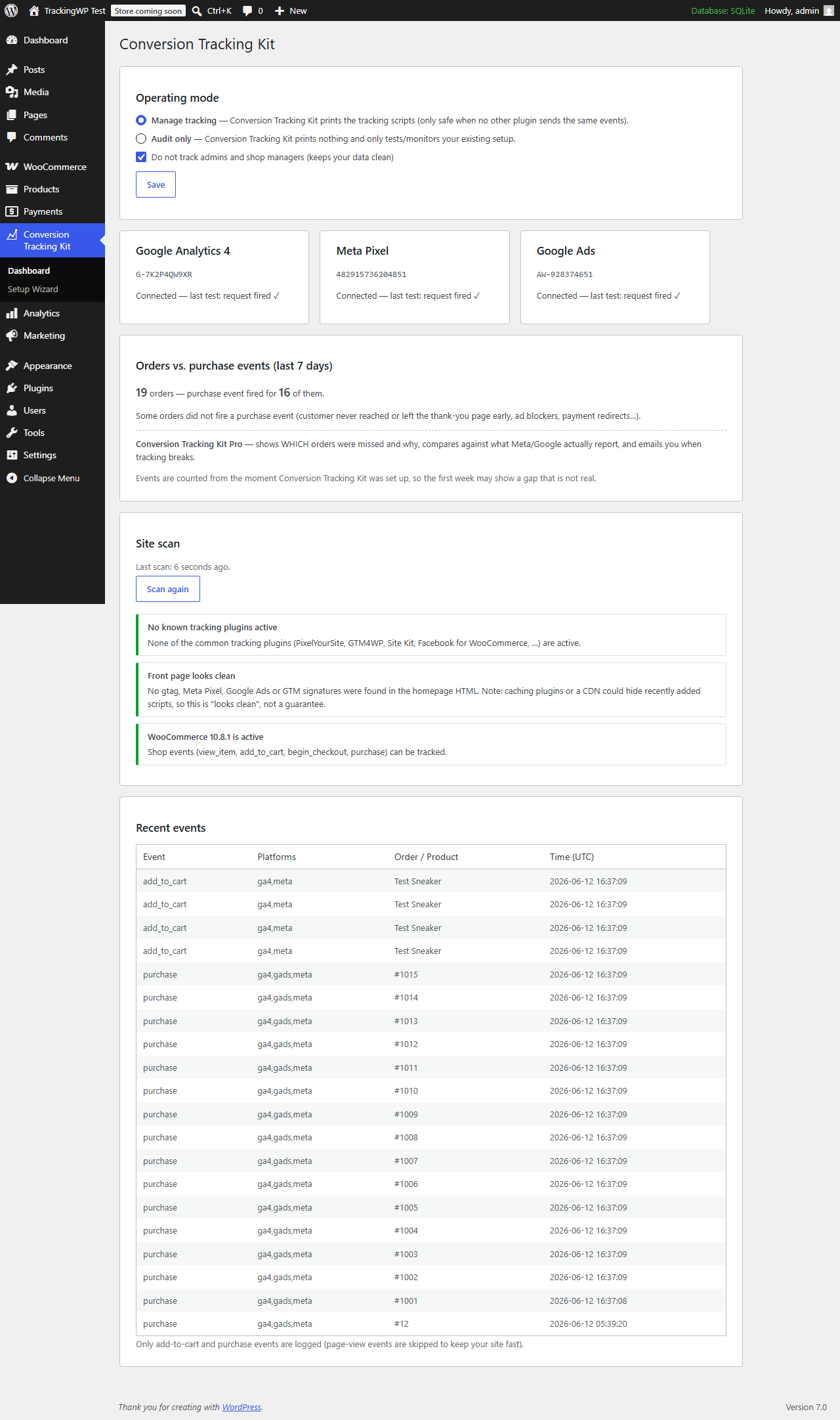
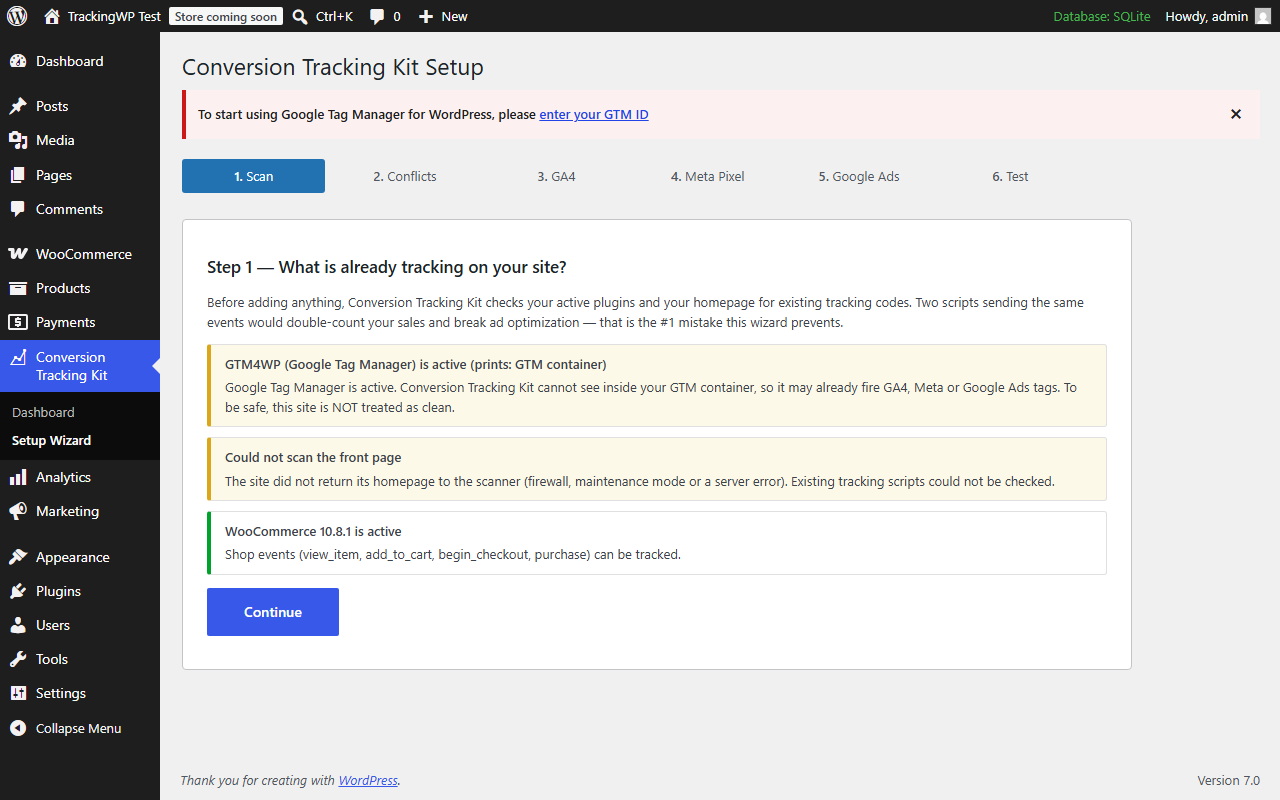
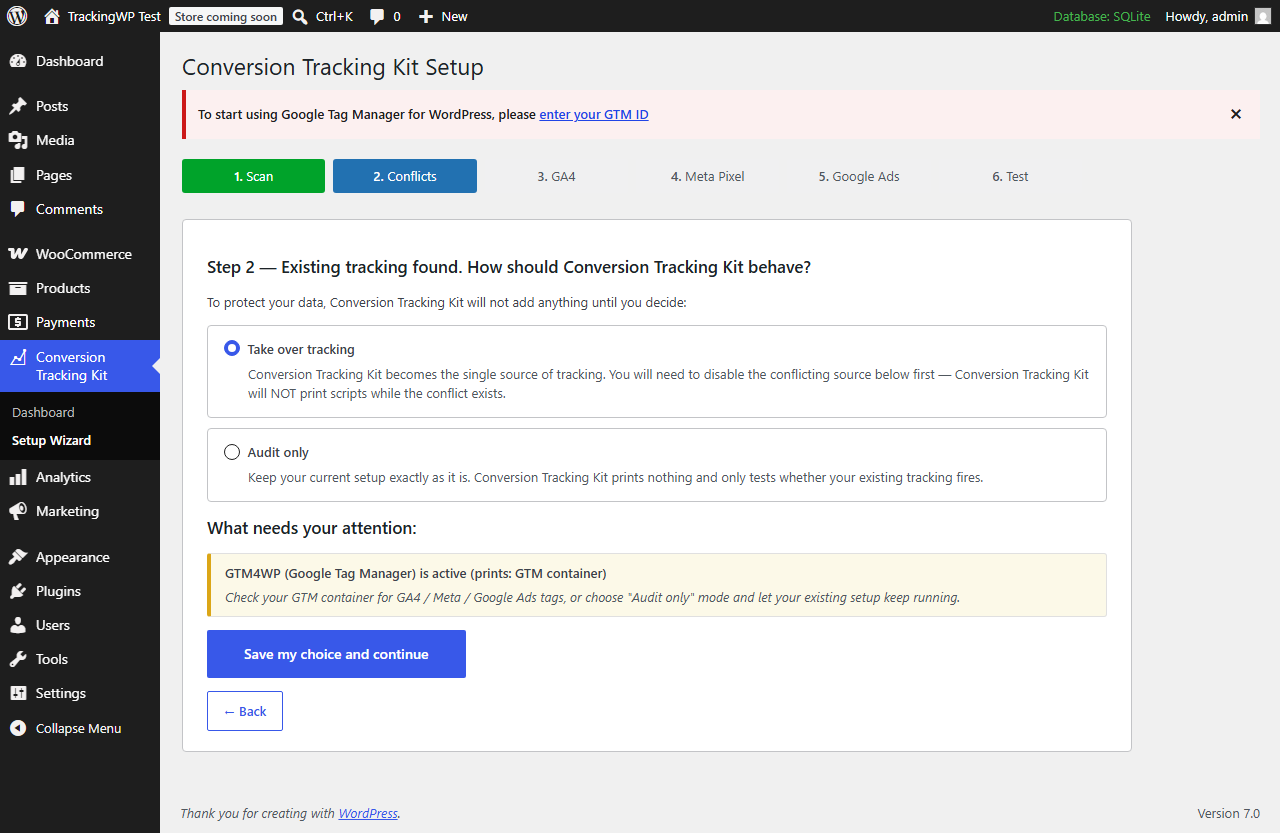
- Conflict protection — scans your plugins and homepage first. If another plugin or your theme already sends events, Conversion Tracking Kit refuses to double-fire and asks you to choose: take over, or audit-only.
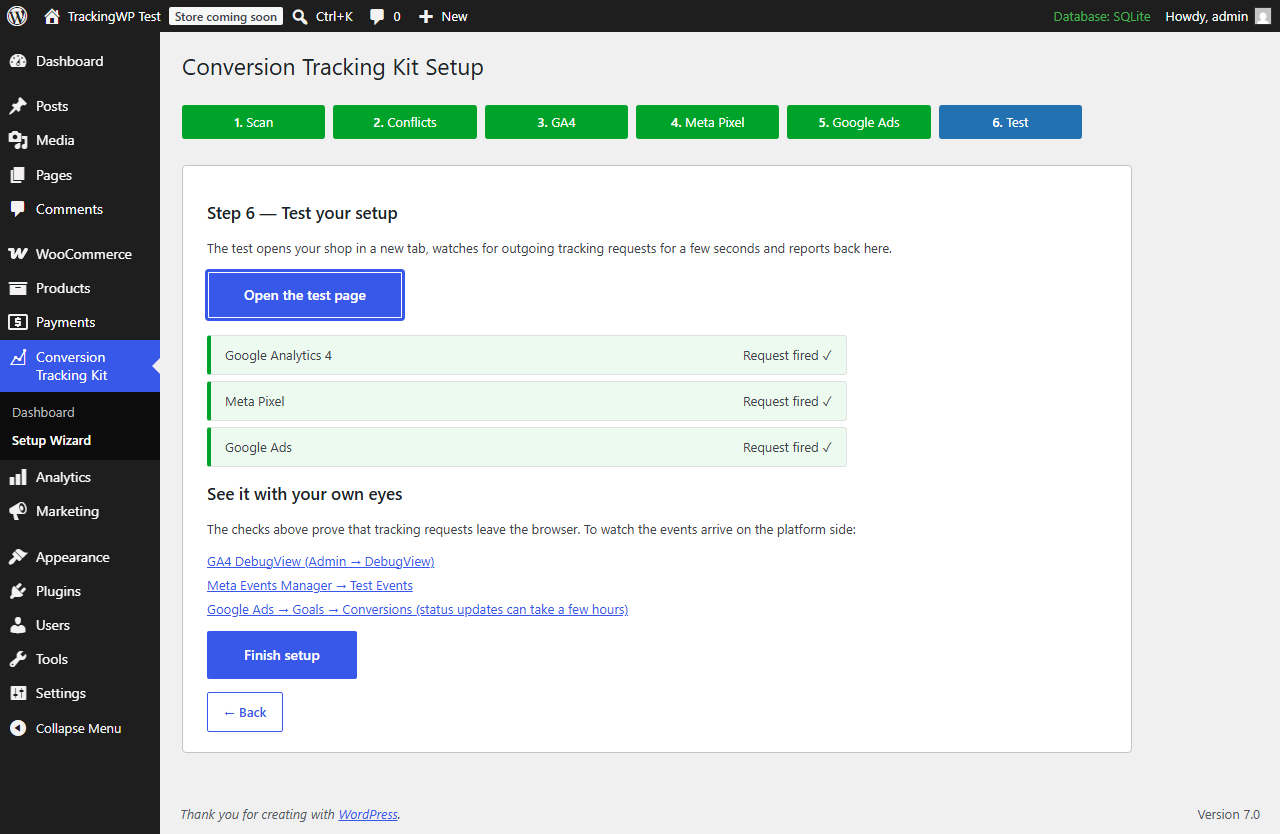
- Setup test — one click verifies the scripts load and tracking requests actually leave the browser, with deep links to GA4 DebugView and Meta Test Events.
- Orders vs. events — a dashboard card compares your recent orders against the purchase events that actually fired.
- Safe by default — purchase deduplication (no double counting on page reloads), Google Consent Mode v2, admin traffic excluded, staging sites never fire events.
The free version tracks view_item, add_to_cart, begin_checkout and purchase for GA4, Meta Pixel and Google Ads.
External services
This plugin is a conversion-tracking tool, so by design it can load the official tracking libraries of the advertising platforms you choose to connect. Nothing is loaded until you enter the corresponding ID in the setup wizard, and tracking is additionally gated by Google Consent Mode v2, admin exclusion and staging detection.
Google (Google Analytics 4 and Google Ads — gtag.js)
When you enter a GA4 Measurement ID (G-…) and/or a Google Ads Conversion ID (AW-…), the plugin loads Google’s gtag.js library from https://www.googletagmanager.com and sends data to Google. What is sent and when: on each page view, and on shop events (view_item, add_to_cart, begin_checkout, purchase), it sends the configured ID(s) together with the event name and its parameters — for example page URL, referrer, product identifiers, transaction ID, order value and currency — subject to the visitor’s consent state. This is used to measure analytics and ad conversions.
Google terms of service: https://policies.google.com/terms — Google privacy policy: https://policies.google.com/privacy
Meta Pixel (Facebook — fbevents.js)
When you enter a Meta Pixel ID, the plugin loads the Meta Pixel library fbevents.js from https://connect.facebook.net and sends data to Meta. What is sent and when: on each page view (PageView) and on shop events (ViewContent, AddToCart, InitiateCheckout, Purchase), it sends the Pixel ID together with the event name and its parameters — for example content identifiers, value and currency — plus standard browser data Meta collects (such as IP address and user agent). When JavaScript is disabled, a fallback tracking image is requested from https://www.facebook.com/tr. This is used to measure ad conversions.
Meta terms of service: https://www.facebook.com/legal/terms — Meta privacy policy: https://www.facebook.com/privacy/policy — Meta Business Tools terms: https://www.facebook.com/legal/terms/businesstools
Showing a cookie banner and collecting the legally required consent for these services remains the responsibility of the site owner; this plugin is not a consent-management plugin.
Mga Screenshot
FAQ
Will Conversion Tracking Kit duplicate my existing tracking?
No — that is the #1 mistake it is built to prevent. Before printing anything, Conversion Tracking Kit scans your active plugins and your homepage for existing GA4, Meta Pixel, Google Ads and GTM code. If it finds any, it will not output a single script until you either remove the conflicting source or switch to audit-only mode.
Do I need API keys or access tokens?
No. The free version only needs the public IDs you already have: a GA4 Measurement ID (G-…), a Meta Pixel ID (a number) and/or a Google Ads Conversion ID (AW-…).
What exactly does the setup test verify?
It verifies that the tracking scripts load on your page and that the browser actually fires network requests to Google and Meta. It does not (and cannot, without API credentials) confirm platform-side receipt — for that, the test screen links you straight to GA4 DebugView and Meta Test Events so you can watch the events arrive yourself.
Yes. Conversion Tracking Kit prints a Google Consent Mode v2 default block before any Google tag. When a known consent plugin (CookieYes, Complianz, Cookiebot, Borlabs, Moove, Real Cookie Banner, iubenda, Termly) is active, consent defaults to denied and your consent plugin stays in charge.
Unrecognized banners cannot be auto-detected, so the automatic default falls back to granted. The dashboard has a “Consent Mode default” setting to override this: choose “always start denied” if your banner sends Google Consent Mode updates itself. Showing a banner and collecting legally valid consent (GDPR/KVKK) remains the site owner’s responsibility — this is not a consent-management plugin.
Why are no events tracked on my staging site?
By design. When the site URL looks like a staging or local environment (localhost, .test, .local, “staging”), Conversion Tracking Kit fires nothing so test traffic never pollutes your real store data.
Why did the purchase event not fire for some orders?
The purchase event fires on the order received (thank-you) page. If the customer never reaches that page (closed the tab, payment app redirect failed) or an ad blocker intervened, the event is missed for that visit — the dashboard card shows you exactly how many orders this affected. Since 1.6.9 the plugin retries automatically on the customer’s next visit to the thank-you page within 7 days (deduplicated platform-side, so nothing is ever counted twice). If the customer never returns at all, that order stays unrecoverable from the browser — recovering it requires sending the conversion from the server via the platforms’ APIs, which needs API credentials and is outside the scope of the free plugin.
Why does Google Ads only receive the purchase event?
By design. Google Ads optimizes bidding on conversions, and for a store the conversion is the purchase — feeding it every add_to_cart as a “conversion” would pollute your conversion column and mislead smart bidding. The full funnel (view_item, add_to_cart, begin_checkout, purchase) still goes to GA4 and Meta, and you can build Ads audiences from the linked GA4 property.
Mga Review
Wala pang reviews para sa plugin na ito.
Mga Contributor at Developer
Ang “Ustun Conversion Tracking for WooCommerce” ay open source software. Ang mga sumusunod na tao ay nag-ambag sa plugin na ito.
Mga Contributor
Isalin ang “Ustun Conversion Tracking for WooCommerce” sa iyong wika.
Interesado sa development?
Tingnan ang code, i-check ang SVN repository, o mag-subscribe sa development log sa pamamagitan ng RSS.
Changelog
1.6.9
- Purchase recovery: an order is now only marked “tracked” after the browser CONFIRMS the tracking libraries actually loaded and the purchase event went out. If an ad blocker killed the scripts or the tab closed mid-load, the thank-you page silently retries on the customer’s next visit (within 7 days) instead of losing the conversion forever. Platform-side deduplication (transaction_id for GA4/Google Ads, eventID for Meta) guarantees no double counting.
- The “orders vs. purchase events” dashboard card is now backed by browser-confirmed events only, so the number you see is the number that really reached the platforms’ endpoints from the browser.
1.6.8
- Fix: bundled translations (Turkish) now actually load on customer sites — the explicit textdomain loading was removed in an earlier compliance pass, which silently left the whole admin UI in English.
- Fix: begin_checkout no longer re-fires on every checkout page reload — it fires once per browser session (again only if the cart total changed).
- New: “Include shipping and tax in the purchase conversion value” setting — untick it to report net product revenue to the ad platforms (common ROAS preference).
- New: the scanner now warns when the homepage contains a cookie banner it does not recognize (hosted CMPs like OneTrust/Usercentrics, hand-built banners) and points to the Consent Mode default setting; sites using the WP Consent API standard get the same hint.
1.6.7
- New: “Consent Mode default” setting on the dashboard — sites whose cookie banner is custom or not on the known-plugin list can now force the Google Consent Mode v2 default to denied (or granted) instead of relying on auto-detection.
- Consent plugin auto-detection now also recognizes Real Cookie Banner, iubenda and Termly.
- FAQ: documented the browser-side tracking limits honestly (missed thank-you pages, why Google Ads only receives purchase).
1.6.6
- New: interactive “Verify Setup” tool — open any page of your site and watch conversion tracking fire live, even when tracking is managed by Google Tag Manager or another plugin. Click a phone / WhatsApp / email link or submit a form and get a per-action ✓/✗ summary plus a live timeline of Google Ads, GA4 and Meta hits.
- Verify tells real Google Ads conversions (label-carrying hits) apart from the base/remarketing tag, merges the multiple endpoints of a single conversion into one row, and warns when more than one GA4 property fires on the same page (likely double counting).
- Verify follows you across pages for 30 minutes (admin-only, never set for visitors), so real journeys like homepage contact page form submit can be tested end to end. A floating pill shows it is live, with a one-click Stop.
1.5.1
- The event log is now a fixed, performance-only rolling buffer: removed the retention filter so no limit is ever raised by payment, and every free feature works fully within it.
- Reworded the dashboard upgrade hints so they only mention capabilities that genuinely require external resources (platform API comparison, server-side CAPI recovery, continuous monitoring and email alerts) — no locally available reporting is held back.
1.5.0
- The plugin now focuses solely on online-sales (WooCommerce) conversion tracking, fully free and fully functional. Lead tracking (calls, WhatsApp, form submissions) has moved entirely to the separate Conversion Tracking Kit Pro plugin — no lead code ships in the free plugin anymore.
- Unified all internal handles under a single, distinct prefix to avoid any chance of conflicts with other plugins.
- Security: the self-hosted update channel now pins TLS verification and only accepts an update package served from the official domain, so a tampered manifest can never point WordPress at an off-site plugin zip.
1.4.0
- New: “Conversions by channel” dashboard card — see where your tracked conversions came from (organic search, Google Ads, Meta, TikTok, direct, referral…), including organic search which ad platforms never credit. Captured first-party from referrer + click IDs; no external API.
1.3.0
- Setup wizard refinements and clearer guidance through the GA4, Meta Pixel and Google Ads steps.
1.1.0
- Extension hooks for add-ons (tracker filter, dashboard action, purchase action).
- Event log: new “source” column (browser/CAPI) and per-order distinct purchase counting.
- Automatic table migration after updates.
1.0.3
- All database queries now use fully prepared statements (%i identifier placeholders); minimum WordPress raised to 6.2.
- gtag.js loader is now properly enqueued (async) via wp_enqueue_script instead of a hardcoded script tag.
- Plugin Check compliance pass.
1.0.2
- Setup test: also detect Meta Pixel requests sent as POST to facebook.com/tr/ without a query string (large payloads) — fixes false “no request detected” for Meta.
1.0.1
- Setup test: raised the resource timing buffer and added a PerformanceObserver stream so tracking requests are not missed on asset-heavy pages (false “no request detected” results).
1.0.0
- Initial release: setup wizard, conflict scanner, GA4 + Meta Pixel + Google Ads tracking, setup test, orders-vs-events comparison, event log, Consent Mode v2.