
Deskripsyon
This plugin is a modification of the “Always valid lightbox” plugin created by Joffrey Quillet. This mod contains a fix for the buggy image resizing and for the description text inside the lightbox popup. Also, it uses only the built-in jQuery library. More info.
Always Valid Lightbox is a Lightbox plugin whose markup adapts to the WP site’s Doctype, in order to always provide a valid HTML markup.
Also, AVL allows the user to chose the attributes he wants inserted on his image links, depending on the Doctype declaration used in the website header.php template.
This way, the lightbox never generates markup validation errors at the W3C Validator test.
The jQuery lightbox effect is an adaptation based on David Ryan’s jQuery lightbox tutorial : http://dryan.com/articles/jquery-lightbox-tutorial/
Mga Screenshot

Pag-install
- Unzip the plugin and upload the ‘always-valid-lightbox-mod’ directory to your
/wp-content/plugins/directory - Activate the plugin through the ‘Plugins’ menu in WordPress
- Configure the plugin in the Always Valid Lightbox configuration section of your administration panel.
FAQ
- I do not understand the plugin configuration page
-
Here’s an explanation for each option :
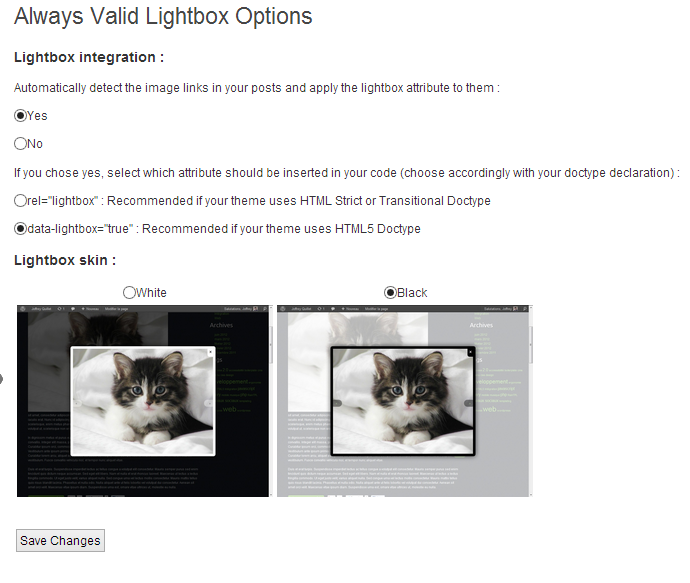
“Automatically detect the image links in your posts and apply the lightbox attribute to them” : “Yes” allows the plugin to work in automatic mode. This means the plugin will automatically detect your images and trigger the lightbox effect when you click on them. If you choose “No”, you will have to manually edit your site contents and mark all the links which should trigger a lightbox effect with the ‘data-lightbox=”true”‘ or the ‘rel=”lightbox”‘ attributes.
“If you chose yes, select which attribute should be inserted in your code (choose accordingly with your doctype declaration)” : only available if you chose ‘Yes’ to the previous option. It allows you to choose the kind of markup the plugin will automatically insert in your page to trigger the lightbox effect. No matter what choice you make, the lightbox will work. However, the W3C validity of your page will depend on it, so you should choose your markup in accordance with the DOCTYPE declaration found in your site header.
“Lightbox skin” : choose the appearance of your lightbox effect
For more information about HTML validation and Doctypes, please consult the following page : http://validator.w3.org/docs/help.html#validation_basics
- How do I display an image title under my lightbox images ?
-
The lightbox effect automatically takes the HTML “title” attribute of your images in order to display image titles. If it is not set, it will use the “alt” attribute instead, so the “title” attribute is not really required.
Mga Review
Wala pang reviews para sa plugin na ito.
Mga Contributor at Developer
Ang “Plugin Name: Always valid lightbox mod” ay open source software. Ang mga sumusunod na tao ay nag-ambag sa plugin na ito.
Mga Contributor
Isalin ang “Plugin Name: Always valid lightbox mod” sa iyong wika.
Interesado sa development?
Tingnan ang code, i-check ang SVN repository, o mag-subscribe sa development log sa pamamagitan ng RSS.
Changelog
1.0
- Initial release of the mod