
Description
If you need paid support to have this plugin installed or need to have a customized version please send an email to support@wordpressforge.com.
Simple, if you use this plugin, rel="nofollow" will be inserted automatically for all the external links on your wordpress posts or pages.
Feature
- Adds
rel="nofollow"to all external links in your wordpress posts/pages - Will not add
rel="nofollow"to any of the internal links of your wordpress posts/pages. - Will not add another
rel="nofollow"to links that already haverel=nofollow - Will remove existing
dofollowfromrel=""if it exists within the link
You can visit our blog blog.wordpressforge.com
Support
Donations
Are always welcome 😉
Screenshots
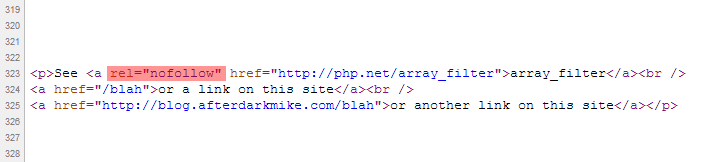
Example of how the rel="nofollow"tag is inserted into all the external links.
Installation
- Download the latest zip file and extract the ‘wpf-force-external-nofollow’ directory.
- Upload it to your ‘/wp-content/plugins/’ directory.
- Activate ‘WPF Force External Nofollow’ in the ‘Plugins’ menu in WordPress.
Reviews
There are no reviews for this plugin.
Contributors & Developers
“WPF Force External Nofollow” is open source software. The following people have contributed to this plugin.
Contributors
Translate “WPF Force External Nofollow” into your language.
Interested in development?
Browse the code, check out the SVN repository, or subscribe to the development log by RSS.
Changelog
1.3
- Fixed readme.txt wording
1.2
- Fixed Typo
1.0
- First released version.