
Description
WP Video Playlist
List of features of plugin.
- You can add Video item in playlist from Media files.
- You can add Video item in playlist from Youtube.
Screenshots
Setup Review order 
Reviews page based on order setup 


Blocks
This plugin provides 1 block.
- WP Video Playlist
Installation
Download the plugin .zip file
Login in to admin Click Plugins -> Add New -> Upload
Find WooCommerce Featured Reviews WordPress Plugin in plugin list and activate it.
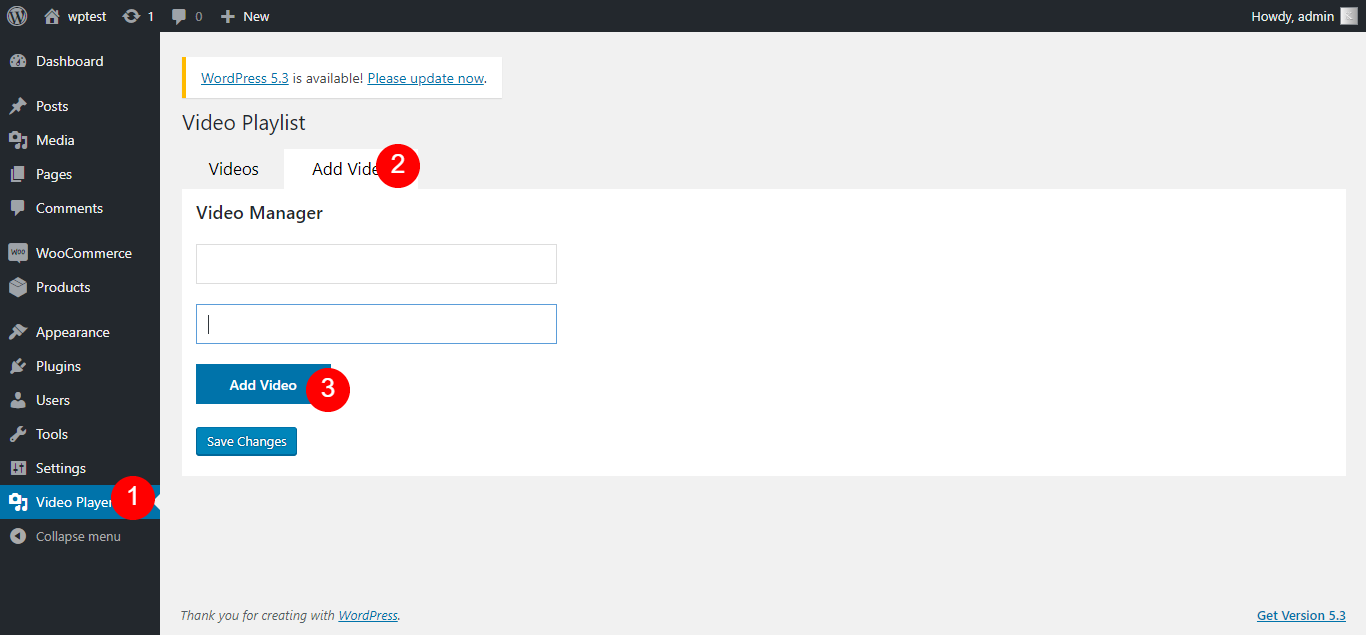
Goto “Video Player“, add video and enjoy.
FAQ
-
How to add it
-
- Open “Video Player” from the sidebar.
- After that click on “Add Video” beside Videos.
- Then click on “Add Video” button and then select the video you want to add.
- You also can add a custom title and URL. The first field for the title and the second one for the video URL.
- After all this click on save and grab the shortcode and paste it where you want to show player.
Reviews

Hulyo 1, 2022
I found this plug-in in the corner of the iceberg. After I downloaded it and tried it, wow! Find out how this plug-in can be so simple and wonderful. Install it and use it immediately. Without any unnecessary settings, the list is automatically created and sneaked in when it is published! What I admire most is the author's mind, which turns out to be open source. I give this plug-in a full score of 100!
Contributors & Developers
“WP Video Playlist” is open source software. The following people have contributed to this plugin.
Contributors
Translate “WP Video Playlist” into your language.
Interested in development?
Browse the code, check out the SVN repository, or subscribe to the development log by RSS.
Changelog
1.0.9
- Now support Elementor and Gutenberg widgets
1.0.8
- Changed: Performance improvements
1.0.7
- Changed: Performance improvements
1.0.6
- Changed: Performance improvements
1.0.5
- Changed: Performance improvements
1.0.4
- Changed: Performance improvements
1.0.3
- Changed: Performance improvements
1.0.2
- Changed: Performance improvements
1.0.1
- Changed: Performance improvements
1.0.0
- Initial release.