
Description
Display Posts (any custom post type), Terms (any custom taxonomy), Users (any role) on Content or Widget Areas by placing a shortcode. Select what to show and design how to show it. Using the plugin is really easy. You will find Tinymce button on post/page editor to quickly inset a list. Also, there’s a separate page for creating or editing list.
List Types
- Mga Post
- Terms
- Mga User
- Terms & Posts
- Users & Posts
Creating a list is just few steps. There are different sets option for different List Type, following options are available for List Type – posts.
Mga Post
- post type
- post mime type
- post status
- post search keyword
- include post by ids
- exclude post by ids
- exclude current post
- posts per page – while using pagination
- post by parent ids
- post by author ids
- post by terms ( tax_query )
- post by meta ( meta_query )
- post by year, month, day ( date_query )
Group Results by
- Taon
- Buwan
- month year
- category, post tag or custom taxonomies
- authors
- parents
Order Results by
- post id
- Pamagat ng Post
- post name
- post publish date
- post modified date
- menu order
- approved comment count
- meta value
- or random
Multi-Page Pagination by
- Next / Previous links
- Numeric navigation flat – Ex: 1, 2, 3.
- Numeric navigation showing in unordered list.
- Enable/Disable pagination by ajax
To Create Template
Templates are designed using Shortcodes. You can create a simple list just showing post title and linked to the post page, or you can display complex list using any of the information relating to post. Some of the available shortcodes are –
- post thumbnail
- post categories
- post tags
- post custom taxonomy terms
- post author name / links / avatar
- post publish time
- post modified time
- post excerpt
- post content
- post meta value (multiple times, with multiple meta keys)
- media thumbnail
Check all of the available shortcodes here.
Check Example
Privacy Policy
W4 Post List uses Appsero SDK to collect some telemetry data upon user’s confirmation. This helps us to troubleshoot problems faster & make product improvements.
Appsero SDK does not gather any data by default. The SDK only starts gathering basic telemetry data when a user allows it via the admin notice. We collect the data to ensure a great user experience for all our users.
Integrating Appsero SDK DOES NOT IMMEDIATELY start gathering data, without confirmation from users in any case.
Learn more about how Appsero collects and uses this data.
Screenshots

Settings Panel 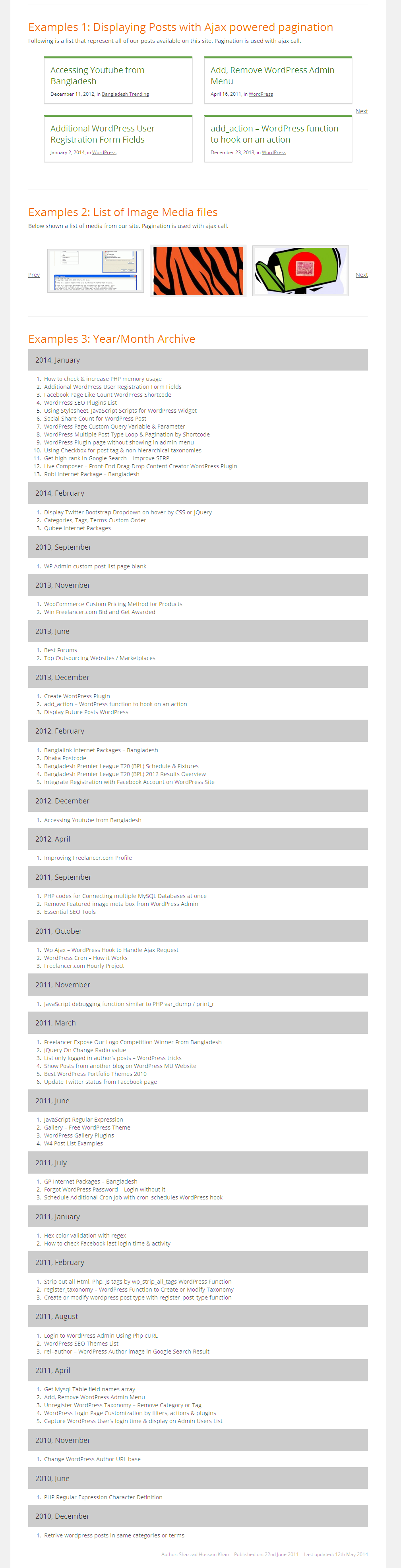
Preview 1 
Preview 2
Blocks
This plugin provides 1 block.
- W4 Post List
Installation
- Upload zip file to the
/wp-content/plugins/directory - Activate the plugin through the
Pluginsmenu in WordPress - You will find W4 post list menu below Posts Menu. Create / manage your list from there.
FAQ
-
How to display a list
-
Each list have a unique id. Display a list by using
[postlist id="LIST_ID"].
Reviews


Contributors & Developers
“W4 Post List” is open source software. The following people have contributed to this plugin.
Contributors
“W4 Post List” has been translated into 1 locale. Thank you to the translators for their contributions.
Translate “W4 Post List” into your language.
Interested in development?
Browse the code, check out the SVN repository, or subscribe to the development log by RSS.
Changelog
2.4.8
- Fix: Prev page navigation button weren’t showing on page 2.
- Fix: Tracking message were showing javascript content on admin notice.
2.4.7
- Updated: Updated php 8.2 compatibility.
2.4.6
- Security: Fixed multiple security issues.
- Fixed: Template attributes removal upon saving.
2.4.5
- Fix: Sanitization were removing html tags from template.
- Change: Updated post list post type capability to page level access.
2.4.4
- Security: Sanitized all form inputs.
2.4.3
- Security: Escaped no items text from XSS injection.
2.4.2
- Updated: WP Version compatibility.
2.4.1
- New: Added search and select option for list block.
2.4.0
- Fixed: Previous pagination link were not showing on page 2.
- Fixed: Default 10 lists per page were showing on block editor list select. Made it to 100.