
Description
A simple captcha for the WordPress login form. To be able to login, the user is required to enter a random 3-digit number in a text field.
The correct number is displayed above the field by a small JavaScript code. Compatible with the WooCommerce login form. Compatible with multisite.
Demo
https://nikolaydev.com/wp-login.php
Simple
- No complicated features
- No settings
- No image generation
- No API
- No sessions
- No cookies
- No IP address detection
- No personal data collection
- No vulnerabilities in the programming code
Recommendation
Bots can also try to login with the XML-RPC feature of WordPress! Very rarely plugins also need this (like the Jetpack plugin). But if you don’t use it, I recommend that you disable it. You can use the super simple one-line plugin Disable XML-RPC.
Notice
This is a simple plugin designed to protect against random bots that try to login on your site. But if a person actually looks at the code of this plugin and specifically designs a new bot that targets this plugin, this bot would be able to bypass the protection.
Screenshots
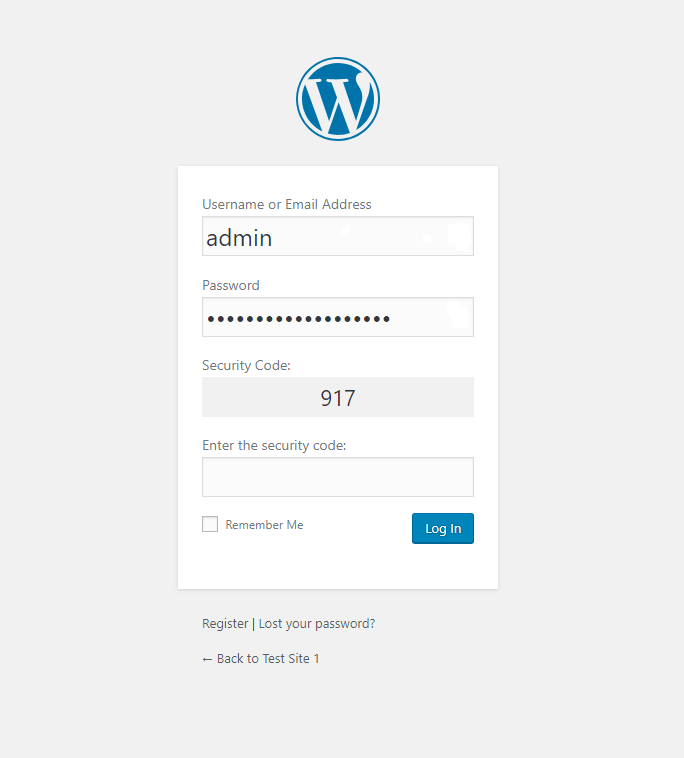
WordPress login form with the simple captcha 
Viewing the number of blocked and passed requests this month
Installation
Simply install and activate the plugin, like you would any normal plugin. There are no settings.
- Visit your Plugins Add New Screen
- Find the plugin by searching for: Simple Login Captcha
- Install the plugin, by clicking the “Install Now” button
- Activate the plugin, by clicking the “Activate” button
FAQ
-
How to deactivate the plugin if it does not allow me to login due to an error?
-
If there is an error or a bug, and you are locked out of the site by this plugin, you can simply delete or rename the plugin folder /wp-content/plugins/simple-login-captcha/ using FTP or the file manager of your hosting.
Reviews


Contributors & Developers
“Simple Login Captcha” is open source software. The following people have contributed to this plugin.
Contributors
“Simple Login Captcha” has been translated into 7 locales. Thank you to the translators for their contributions.
Translate “Simple Login Captcha” into your language.
Interested in development?
Browse the code, check out the SVN repository, or subscribe to the development log by RSS.
Changelog
1.3.6 – 1 January 2024
- Added: Translated language files for French (thanks to Fabrice).
1.3.5 – 20 February 2023
- Added: Translated language files for Brazilian Portuguese (thanks to Rodrigo).
1.3.4 – 2 December 2022
- Improved: Deletes part of the old data about monthly number of passed or blocked logins so it does not increase the number of options in the database over the years (even though it was an insignificant amount anyway).
- Improved: The data about the monthly number of passed or blocked logins is now saved in a way that will avoid automatically loading it in the cached list of options in the server memory, since it is not needed there.
1.3.3 – 11 April 2021
- Added: Compatibility with front-end login forms that use the wp_login_form function (but the form must not be cached by a caching plugin).
1.3.2 – 16 December 2020
- Added: Translated language files for Polish (thanks to Karol).
1.3.1 – 16 December 2019
- Fixed: The language files were not loaded if they were only present in the plugin languages folder (and not in wp-content/languages/plugins).
1.3.0 – 13 December 2019
- Added: Compatibility with the WooCommerce login page.
- Added: Translated language files for German (thanks to Tilo).
- Improved: The gray container of the security code now has a slight border.
1.2.0 – 10 September 2019
- Improved: In a multisite, when activated on separate sub-sites only, now uses one global database table.
- Fixed: In a multisite, when network activated, it would not work in login pages of separate sub-sites. It would work only on the main site login page, and on the login pages for other site, it would not let anyone in.
- Fixed: Changed the label tag surrounding the “Security Code” text, to a span tag. Since there is no field to fill there, it was not correct to use it.
1.1.0 – 4 May 2019
- Improved: The correct number is now displayed as a result of a small JavaScript calculation (so not in plain text).
- Updated: Language files.
1.0.0 – 11 April 2019
- Initial release.