Description
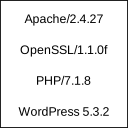
Displays Apache and PHP version in footer of admin section for easy access.
These information are usually needed if reporting bugs or checking hosting service configuration. WordPress displays only it’s own version which is not enough.
Plugin is very simple and uses almost no resources. After all, it just displays version information.
Installation
- Extract package and upload to plugins directory
- Activate the plugin through the ‘Plugins’ menu in WordPress
FAQ
None
Reviews
There are no reviews for this plugin.
Contributors & Developers
“Show Apache and PHP version” is open source software. The following people have contributed to this plugin.
Contributors
Translate “Show Apache and PHP version” into your language.
Interested in development?
Browse the code, check out the SVN repository, or subscribe to the development log by RSS.
Changelog
0.1
Initial release