
Description
Postmatic Social Commenting takes a lighter weight approach than traditional Social Login plugins.
The big difference
No WordPress users are created. Nobody is logged in. This is not social login, it is social commenting. That means it is simple, lean, and whoopingly fast.
How it works
- Users click the social network icon of their choice when they want to leave a comment.
- The social network asks their permission to share their name, profile image, and email address with your site.
- If they agree a standard WordPress cookie is added to their browser and the comment form is ready for their reply. When they return to your site they are already authorized. Nice.
Screenshots
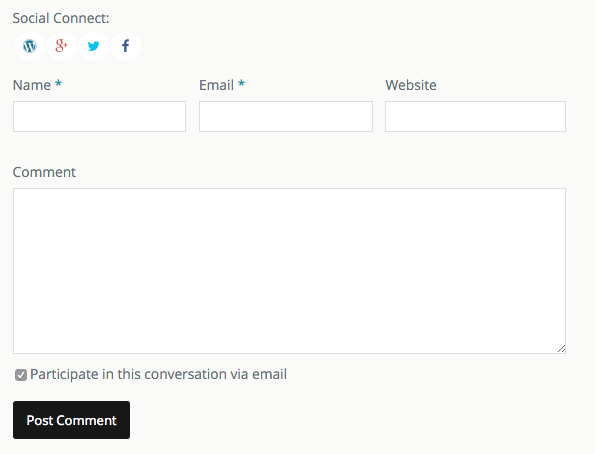
Activated social networks are displayed as subtle icons on your comment form. 
Authenticating leaves no boxes to fill out except the important one: the comment. 
The admin ui. Simple and clean with plenty of tutorials and videos to walk you through setting up each network.
Installation
The usual. Install. Activate. Head for Settings > Postmatic Social Commenting
Like most all social plugins, this thing takes some work to get up and running. We wish it were otherwise.
You must create an app for each network. We’ve included some fantastic tutorials and videos to help you through the process. It’s not difficult work, but it’s not exactly fun. Luckily you only have to do it once and then it’s high fives from all of your commenters. Forever.
FAQ
- Can my users log in using this plugin?
-
Proudly, no. This isn’t a heavy weight social everything kind of plugin. No users. No logins. No sharing (no sharing!). If you want your users to be able to comment without filling out a name, email, and website this is your plugin is your new best friend. If you want more than that try WordPress Social Login.
- Do I have to generate api keys for each network I want to use?
-
Yes, sorry. You will have to create new apps, configure them, and get keys. We’ve taken the pain out of it though by including a bunch of videos and tutorials to walk you through it. You’ll find them on the setting screen for each network.
- Can I customize the social network icons or placement?
-
You certainly can via css. We don’t offer any options in the plugin settings yet though. The default style which we have included is simple, elegant, and works well with any theme.
- If a user connects with their social profile can they still subscribe to comments?
-
Totally. When the user connects with their social network we grab their email address so it can be passed along to Postmatic. This is not true of Twitter (which doesn’t offer email addresses) but if they connect with Twitter and then check the box to subscribe to other comments we’ll prompt them for their email address.
Reviews


Contributors & Developers
“Postmatic Social Commenting” is open source software. The following people have contributed to this plugin.
Contributors

Translate “Postmatic Social Commenting” into your language.
Interested in development?
Browse the code, check out the SVN repository, or subscribe to the development log by RSS.
Changelog
1.1.1
- Fixed stuborn stylesheet from 1.1
1.1
- Improved layout compatability with Epoch
- Fontawesome is not loaded unless needed
1.0.2
- New layout to play nicely with 4.4
- Accessibility and semantic improvements
- Fixed a bug in which Postmatic subscriptions would happen by mistake
- Fixed a bug in which email addresses would get funky when connecting with Twitter
1.0.1
- Fixed a seriously serious bug in which Akismet would get very upset with social comments. Should be all better now.
- Better integration with Postmatic for gathering email subscriptions.
- Better language when asking for an email address.
1.0
- Initial release