
Description
Integrates Max Mega Menu with the WooCommerce StoreFront theme.
Requires Max Mega Menu and StoreFront.
This plugin will add a ‘StoreFront’ menu theme (designed for a dark StoreFront header background. If you are using a light header background color you will need to update the theme font colors under Mega Menu > Menu Themes).
This plugin will also remove residual styling from contents within mega sub menus.
IMPORTANT: When Max Mega Menu is enabled, the “Primary Menu” menu will be displayed on both desktop and mobiles. The “Handheld Menu” will not be used.
Screenshots

Max Mega Menu working with StoreFront 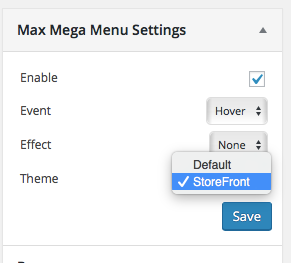
This plugin adds a preconfigured "StoreFront" theme
Installation
- Go to the Plugins page in WordPress
- Search for “Max Mega Menu – StoreFront Integration”
- Click “Install”
After installation go to Appearance > Menus. In the Max Mega Menu Settings box (on the left) change the Theme setting to “StoreFront”.
Reviews


Contributors & Developers
“Max Mega Menu – StoreFront Integration” is open source software. The following people have contributed to this plugin.
Contributors
Translate “Max Mega Menu – StoreFront Integration” into your language.
Interested in development?
Browse the code, check out the SVN repository, or subscribe to the development log by RSS.
Changelog
1.0.3
- Fix: StoreFront 2.4.4+ compatibility. On mobile, the footer search icon doesn’t/didn’t work when Max Mega Menu is enabled.
1.0.2
- Fix: StoreFront 2.2.6+ compatibility. On mobile, the footer search icon doesn’t/didn’t work when Max Mega Menu is enabled.
1.0
- Add support for “Storefront WooCommerce Customizer”. Make menu full width when “Cart Link” option has been unchecked (https://docs.woocommerce.com/document/storefront-woocommerce-customiser/)
- Add support for “Storefront Powerpack”. Make the menu full width when the header layout customizer has been used
- Fix: Change “Navigation” to “Menu” to reflect update to the StoreFront theme
- Fix: Positioning of menu when sticky
- Fix: Clear mobile menu so that it sits below site branding instead of inline
0.1
- Initial version