
Description
It will help you to increase your upload filesize limit.
Screenshots
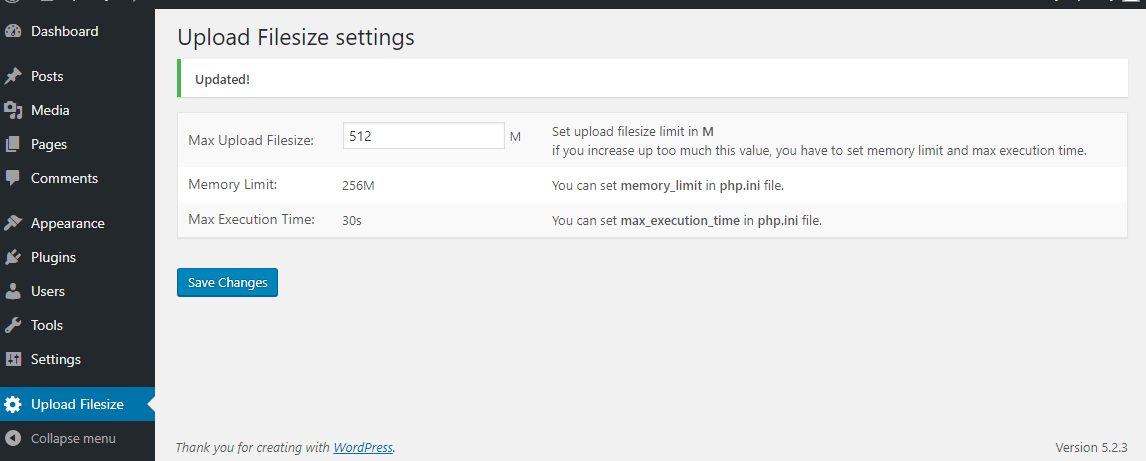
screenshot-1.png
Installation
- Upload the plugin files to the
/wp-content/plugins/plugin-namedirectory, or install the plugin through the WordPress plugins screen directly. - Activate the plugin through the ‘Plugins’ screen in
WordPress
Reviews

Hunyo 29, 2023
This is the best plugin to increase upload limit. All problems are solved with one click.

Nobyembre 11, 2020
3 replies
It runs with 5.5.3–pt_BR !
(1) I tried 25MB in the plugin config, to begin with...
But I got:
"Unexpected response from the server. The file may have been successfully uploaded. Check the media library or reload the page."
Working on that...
(2) Uninstalling the plugin changes the maximum size from 2 to 8MB.
(3) There's no use changing php.ini -> upload_max_filesize = 25M in [$HOME] or [ $HOME/php ] directory (I´m hosted).

Hulyo 8, 2020
A simple plugin that does what it needs to do.. in stark contrast with a lot of other options in the WP repository
Thanks!! 😀

Hunyo 29, 2020
Just worked for me but I gues is also depends on the hoster.
Contributors & Developers
“Max upload filesize” is open source software. The following people have contributed to this plugin.
Contributors
“Max upload filesize” has been translated into 1 locale. Thank you to the translators for their contributions.
Translate “Max upload filesize” into your language.
Interested in development?
Browse the code, check out the SVN repository, or subscribe to the development log by RSS.
Changelog
1.1.0
correct activation function
1.0.1
correct negative input.
1.0
The first version 1.0