
Description
Lorem Ipsum by Webline is an easy to use plugin with Lorem Ipsum Shortcode Generator to generate dummy text using dynamic shortcode that you can use in any posts and pages.
This plugin uses Lorem Ipsum API (http://loripsum.net/api) to fetch lorem ipsum text which is free.
No need of authentication such as password and API keys Generation for Lorem Ipsum API.
We are not making any call backs to our server and not storing any data of user.
Key Features
-
Control for specify number of paragraphs with paragraph length.
-
You can also specify below extra parameters to get different output.
- Decorate – Add bold, italic and marked text.
- Link – Add links.
- UL – Add unordered lists.
- OL – Add numbered lists.
- DL – Add description lists.
- BQ – Add blockquotes.
- CODE – Add code samples.
- Headers – Add headers.
- All Caps – Use ALL CAPS.
- Prude – Prude version.
- Plaintext – Return plain text, no HTML.
-
Preview Text is also available to see your output.
Screenshots
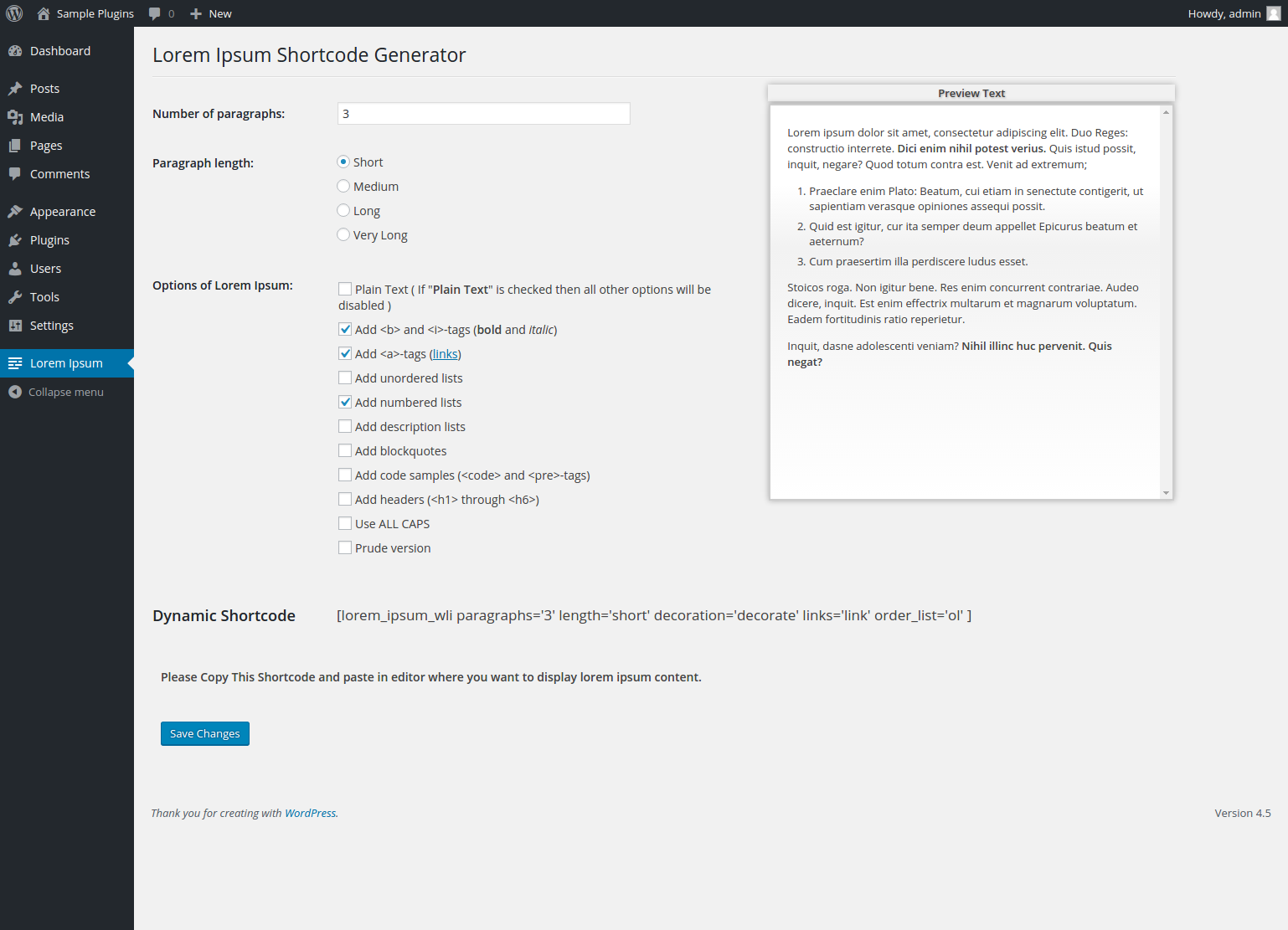
Backend Lorem Ipsum Shortcode Generator settings 
Frontend view
Installation
- Unzip ‘lorem-ipsum-by-webline.zip’ to the ‘/wp-content/plugins/’ directory or add it by ‘Add new’ in the Plugins menu.
- Activate the plugin through the ‘Plugins’ menu.
- Go to Lorem Ipsum in the admin menu.
Reviews

Contributors & Developers
“Lorem Ipsum by Webline” is open source software. The following people have contributed to this plugin.
Contributors
Translate “Lorem Ipsum by Webline” into your language.
Interested in development?
Browse the code, check out the SVN repository, or subscribe to the development log by RSS.
Changelog
1.0.7
Release Date: April 15, 2024
* Fix: Checked compatibility with WordPress version 6.5.2
* Fix: Minor bug fixes
1.0.6
Release Date: March 22, 2024
* Enhancement: Minor UI optimization for Information Banner.
1.0.5
Release Date: January 31, 2024
* Fix: Checked compatibility with WordPress version 6.4.3
* Enhancement: Moved plugin settings as submenu under WordPress Settings
1.0.4
Release Date: February 02, 2023
* Fix: Minor bug fixes.
* Fix: Checked compatibility with WordPress version 6.1
1.0.3
Release Date: January 01, 2020
* Fix: Resolved conflict issue.
1.0.2
Release Date: April 25, 2016
* Small bug fixes.
* Added feature of save settings.
1.0.1
Release Date: April 06, 2016
* Small bug fixes.
1.0.0
Release Date: November 30, 2015
* Initial release