Description
As it’s name, it will fix Leverage Browser Caching issues in your WordPress website. Also it improves page speed score in website testing tools like: Pingdom, GTmetrix, PageSpeed, Google PageSpeed Insights, YSlow etc.
About Leverage Browser Caching
Leverage Browser Caching means storing static files of a website in visitor browser. And then retrieving them from browser quickly instead again from server. Actually it uses to speed up each page of a website.
How Leverage Browser Caching Works?
When you visit a web page, your browser downloads all content of the particular page as well as common static files like css and js files. And when you visit other page of same website, your browser downloads them again. But if you have enabled Leverage Browser Caching, then all statics files will serve from your browser instead server. Now when you will visit any page of the particular website, it will only download unique contains of the page and static files will serve from your browser. in this way, it speed up each page of a website.
Benefits of Leverage Browser Caching
Primary benefit is speeding up website because static files will serve from your browser. it saves internet data of website visitor. it also saves bandwidth of website server and decrease load of server. Simply it decreases HTTP requests.
Screenshots
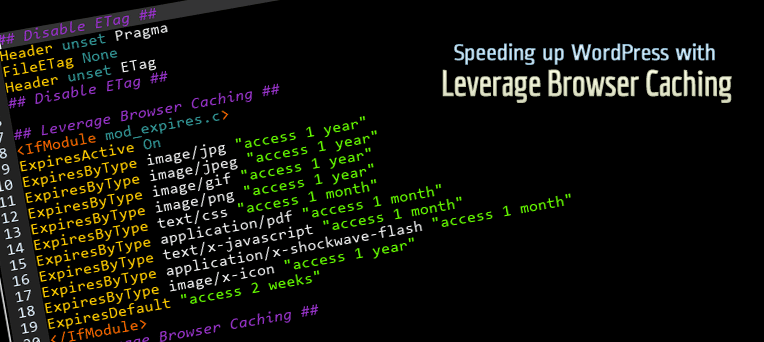
Code View
Installation
These are ways to install ‘Leverage Browser Caching’ plugin.
Simplest: Using WordPress Dashboard
- Open Dashboard of your WordPress website and then add new plugin page, here: Dashboard > Plugins > Add New.
- Now search for ‘Leverage Browser Caching’.
- Click ‘Install Now’
- Activate the plugin on the Plugin dashboard
Uploading on Dashboard
- Download plugin zip file from: https://wordpress.org/plugins/leverage-browser-caching/
- Now open Dashboard and then add new plugin page, here: Dashboard > Plugins > Add New.
- Now click on ‘Upload Plugin’ button.
- Click on ‘Browse…’ to select downloaded zip file. Now simply install and activate it.
Uploading using FTP
- Download plugin zip file from: https://wordpress.org/plugins/leverage-browser-caching/
- Extract this zip file to find folder ‘leverage-browser-caching’
- Now upload ‘leverage-browser-caching’ folder inside plugins directory, here: ‘–WP-ROOT–/wp-content/plugins/’
- Now open Dashboard and then plugins page. Find this plugin and activate it.
FAQ
-
Will it works for my website?
-
It works for apache server. simply it adds browser caching code inside htaccess file.
-
Where are plugin options
-
This plugin does not have any option. When you will activate it, it will start working. When you will deactivate it, it will stop working.
-
Some JavaScript files still display under Leverage Browser Caching
-
It is because a website can’t store files of other website in browser. suppose your website is example.com then it will unable to store any file of example2.com website. Read More…
-
I need support
-
Please create support topic Here
Reviews


Contributors & Developers
“Leverage Browser Caching” is open source software. The following people have contributed to this plugin.
Contributors
Translate “Leverage Browser Caching” into your language.
Interested in development?
Browse the code, check out the SVN repository, or subscribe to the development log by RSS.
Changelog
2.3
- Tested up to 6.3
2.2
- Tested up to 6.0
2.1
- 14 December, 2020
- Tested up to 5.6
2.0
- 24 July, 2020
- Tested up to 5.4.2
- Remove action link
- New info message
1.9
- 26 Nov, 2019
- Tested with 5.3
- Increased version
1.8
- 23 Feb, 2018
- Removed rate this plugin codes.
- Added donate link
- Increased version
1.7
- 07 August =, 2018
- Description updates.
- Rating link.
1.6
- 07 Feb, 2018
- Fix: Fatal Error
1.5
- 15 November, 2017
- Check capability
1.4
- 1 November, 2017
- Small Bug Fixed
- Refactor credit
1.3
- 1 November, 2017
- Credit Links Changes
1.2
- 26 October, 2017
- Credit Links Updated
1.1
- 01 August, 2017
- Issue Fixed: ExpiresByType
1.0
- 30 June, 2017
- First Release