
Description
Integrate AWeber and Contact Form 7
Features:
- Easy to use
- Send and save subscriber data to AWeber account
- Supports multiple accounts and lists
- Simple to map contact form fields(mail tags) to AWeber list fields
- Fast and secure
- Uses latest aweber api with OAuth 2.0
- Compatible with Contact Form 7 (4.2 or higher)
Screenshots
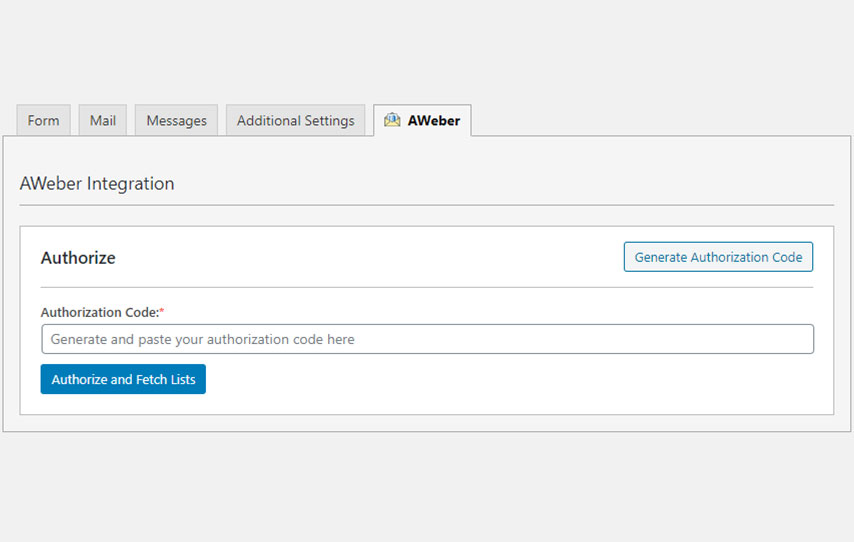
Get authorization code and fetch lists. 
Select list to connect. 
Add subscriber details and save.
Installation
- Upload the entire
cf7-awbdirectory to the/wp-content/plugins/directory, or install the plugin through the WordPress plugins screen directly. - Activate the plugin through the ‘Plugins’ screen in WordPress.
- Use
Awebertab in your Contact Form 7 editor to configure the plugin.
Reviews
There are no reviews for this plugin.
Contributors & Developers
“Integrate AWeber and Contact Form 7” is open source software. The following people have contributed to this plugin.
Contributors
Translate “Integrate AWeber and Contact Form 7” into your language.
Interested in development?
Browse the code, check out the SVN repository, or subscribe to the development log by RSS.
Changelog
1.0.0
- Initial release.
1.0.1
- Minor bug fixes.