Lumaktaw patungo sa content
WordPress.org

Tagalog

  • Themes
  • Plugins
  • Mga Balita
  • Suporta
  • Tungkol Sa
  • Mag-translate
  • Makipagkita
  • Makipag-uganayan
  • Taga-pangangasiwa
  • WPUGPH
  • Get WordPress
Get WordPress
WordPress.org

Plugin Directory

Guest Author

  • Mag-submit ng plugin
  • Aking mga paborito
  • Mag-log in
  • Mag-submit ng plugin
  • Aking mga paborito
  • Mag-log in

Guest Author

Ni WebFactory
I-download
  • Mga Detalye
  • Mga Review
  • Development
Suporta

Deskripsyon

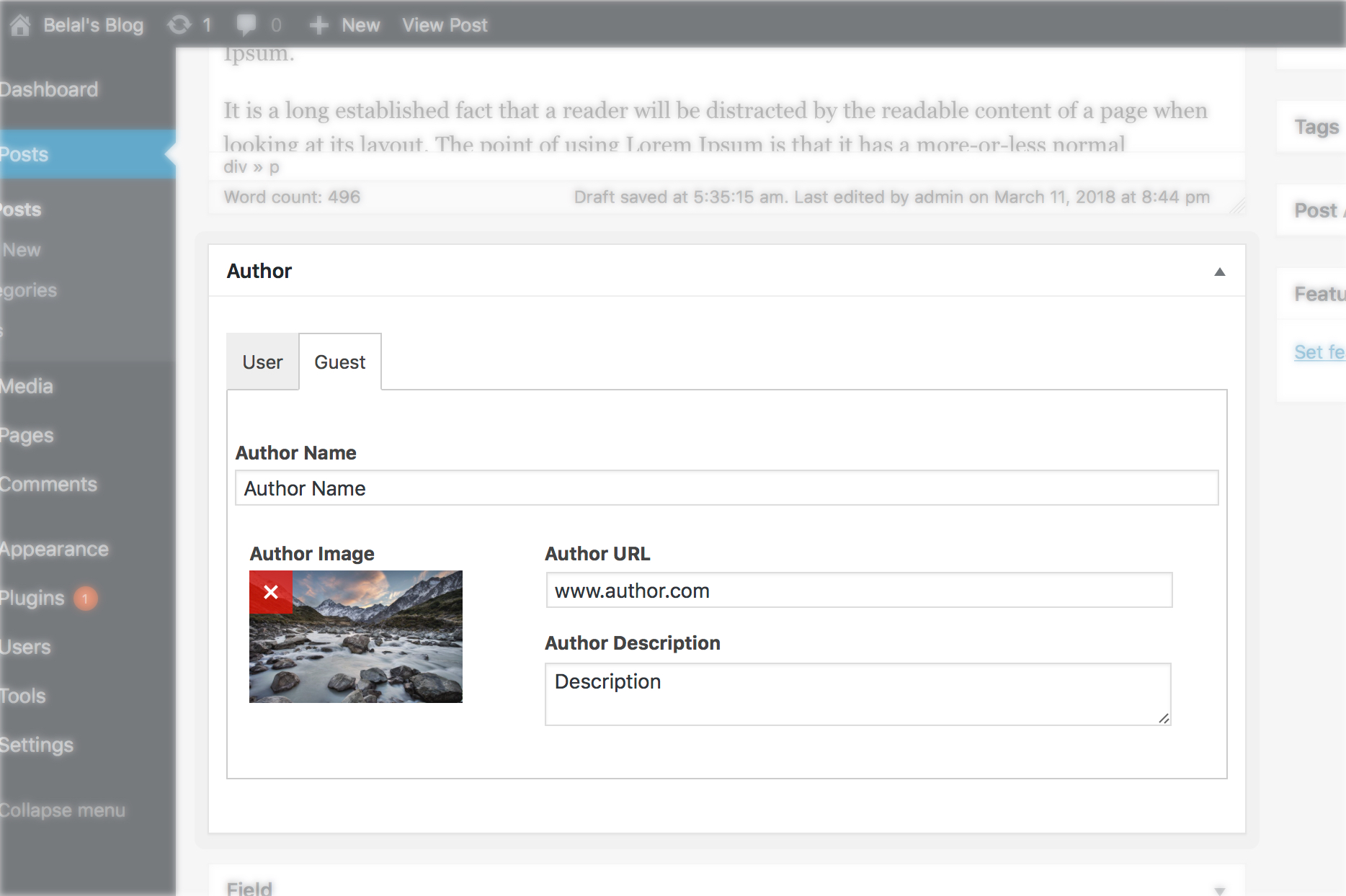
Add a guest author to any post without needing to register the guest author as a user on your site.

Features

  • ✍️ Behaves as if guest authors were regular authors.
  • 👤 Upload your own avatar image instead of using Gravatar.
  • 🌍 Link to a custom page for the guest author.
  • 🔥 Perfect for guest posts.

Looking for nicer author boxes with more options? Check out our free Simple Author Box plugin.

Mga Screenshot

  • Gives you the ability to switch between registered user author and guest author.

FAQ

How to disable this plugin?

Just use standard Plugin overview page in WordPress admin section and deactivate it or rename plugin folder /wp-content/plugins/guest-author over FTP access.

Will it slow my site down?

No, it won’t. It’s only loaded on the pages it protects.

How can I report security bugs?

You can report security bugs through the Patchstack Vulnerability Disclosure Program. The Patchstack team help validate, triage and handle any security vulnerabilities. Report a security vulnerability.

Mga Review

What they call support is rather weird

Hanno Pebrero 28, 2025
There was another comment that I’m simply repeating here because it describes my situation exactly – after three years, nothing has changed:”They don’t test their plugin with the best/highest selling premium themes, so they have zero clue if their plugin will work with those themes or not. They just blindly hope that their plugin works and if it doesn’t, it’s the Theme’s fault only.”

Feature request: nofollow the guest author URL

Nima Shayanfar Nobyembre 5, 2024 1 na reply
The plugin works as advertised and is quite simple and handy. I have one request though. These days nofollowing the URL might be suitable for some admins. So it is missing.

Personal URL not working

Jin-Liang, Lin Disyembre 30, 2022
My site use the themes “Twenty Twenty-Two”. Custom URLs will not appear on the name.

Close to perfection

gunawan004 Disyembre 7, 2022
Its good, but didnt save the guest data so i have to write the same data over and over again

Support only Free themes

dhirajshah Agosto 29, 2022
They don’t test their plugin with the best/higest selling premium themes, so they have zero clue if their plugin with work with those themes or not. They just blindly hope that their plugin works and if it doesn’t, it’s the Theme’s fault only.

Works as described

inspired888 Hulyo 5, 2022 1 na reply
I am mostly writing this review to counter what was written here: crudoadmin — March 5, 2021 — Its a piece of junk In my experience, the URL, Description and Avatar boxes are only greyed out if you haven’t yet added an Author Name. If that first field (Name) is empty, then the other fields are disabled. This is to prevent people adding data to those other fields without providing an author name. Makes perfect sense to me. I suspect “crudoadmin” might not have taken the time to really test out what was going on. As for the plug-in itself … works well. Out theme was even able to pull in the image, URL, and description (in the same way it pulls in the image, URL, and Bio from a registered user/author). Which means this plug-in is storing that info in standard Wordpress fields, as opposed to making something up (which was the case with the Simply Guest Author plug-in, which we had to ditch for that very reason).
Basahin lahat ng 14 na review

Mga Contributor at Developer

Ang “Guest Author” ay open source software. Ang mga sumusunod na tao ay nag-ambag sa plugin na ito.

Mga Contributor
  • WebFactory

Ang “Guest Author” ay naisalin na sa 7 (na) mga locale. Salamat sa mga tagasalin para sa kanilang mga kontribusyon.

Isalin ang “Guest Author” sa iyong wika.

Interesado sa development?

Tingnan ang code, i-check ang SVN repository, o mag-subscribe sa development log sa pamamagitan ng RSS.

Changelog

2.61

  • 2025-09-18
  • minor code fix

2.6

  • 2025-08-11
  • minor code fixes

2.5

  • 2023-12-05
  • Guest author name bug fix

2.4

  • 2023-11-29
  • security fix

2.3

  • 2022-11-22
  • minor fixes

2.2

  • 2020-05-09
  • minor fixes

2.1.8

  • Bug fixes

2.1.5

  • Makes author links optional. You can just leave the link blank.
  • Bug fixes

2.1.3

  • Bug fixes

2.1.2

  • Fixes a bug where the plugin doesn’t work with ajax requests

2.1

  • Fixes an issue with author avatar displaying for user comments
  • Now uses theme defaults for avatar styles

2.0

  • Adds support to Gutenberg. Finally 🎉

1.9.1

  • Adds support to Elementor’s Author Box Widget

Meta

  • Bersyon 2.61
  • Huling na-update 2 buwan ang nakalipas
  • Mga aktibong installation 5,000+
  • Bersyon ng WordPress 4.6 o mas bago
  • Sinubukan hanggang 6.9.1
  • Bersyon ng PHP 5.2.4 o mas bago
  • Mga Wika

    Arabic, Chinese (Taiwan), Dutch, English (US), German, Portuguese (Portugal), Russian, at Swedish.

    Isalin sa iyong wika

  • Mga Tag
    authorguestguest authorguest postpost author
  • Advanced View

Mga Rating

4.2 out of 5 stars.
  • 10 5-star reviews 5 stars 10
  • 1 4-star review 4 stars 1
  • 1 3-star review 3 stars 1
  • 0 2-star reviews 2 stars 0
  • 2 1-star reviews 1 star 2

Idagdag ang aking pagsusuri

Tingnan lahat ng review

Mga Contributor

  • WebFactory

Suporta

Mga isyu na nalutas sa nakalipas na dalawang buwan:

1 sa 1

Tingnan ang support forum

  • About
  • News
  • Hosting
  • Privacy
  • Showcase
  • Themes
  • Plugins
  • Patterns
  • Learn
  • Support
  • Developers
  • WordPress.tv ↗
  • Get Involved
  • Events
  • Donate ↗
  • Five for the Future
  • WordPress.com ↗
  • Matt ↗
  • bbPress ↗
  • BuddyPress ↗
WordPress.org
WordPress.org

Tagalog

  • Visit our X (formerly Twitter) account
  • Bisitahin ang aming Bluesky account
  • Visit our Mastodon account
  • Bisitahin ang aming Threads account
  • Visit our Facebook page
  • Visit our Instagram account
  • Visit our LinkedIn account
  • Bisitahin ang aming TikTok account
  • Visit our YouTube channel
  • Bisitahin ang aming Tumblr account
Ang Code ay Tula.