
Description
Consider this scenario:
a) Your site uses multipage Gravity Forms.
b) Your user logs in to the site and starts filling up a 5-step form.
c) During the 3rd step, the user leaves without completely finishing the form.
d) Some days later, the user comes back and logs in to see that his inputs are all gone!
This happens because Gravity Forms by default does not save partially submitted forms.
Our plugin resolves this issue. Simple!
Screenshots
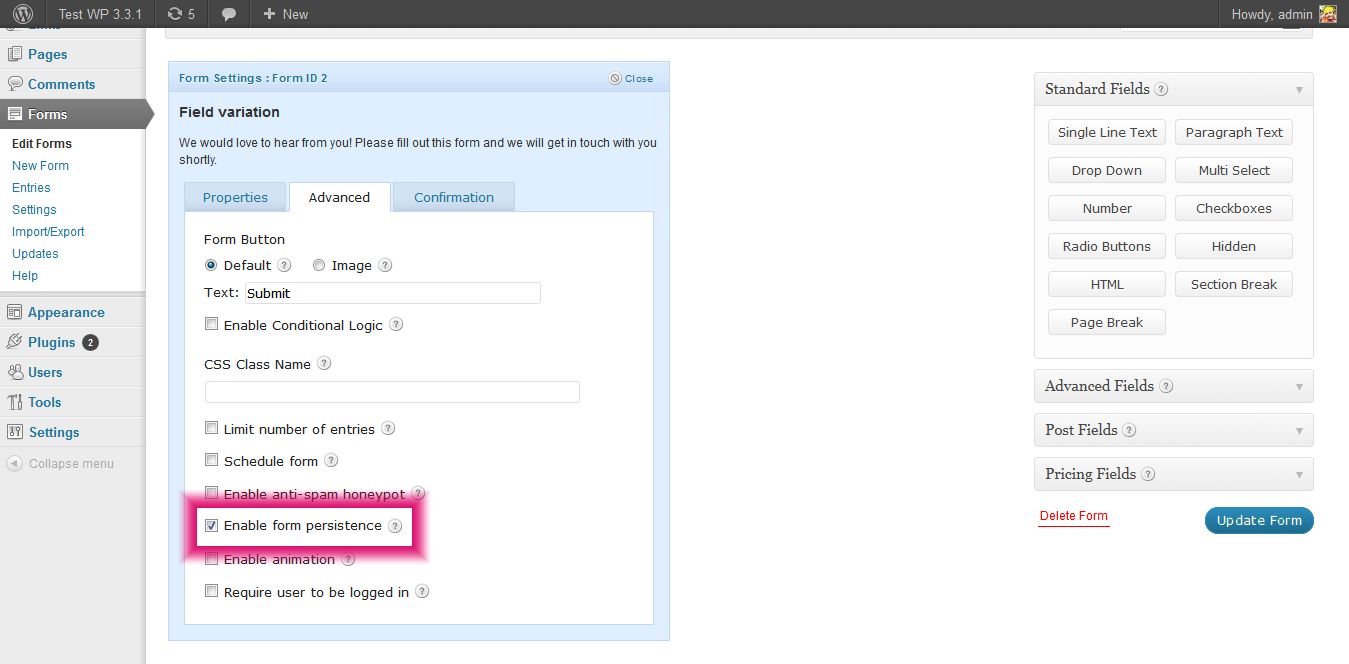
Just click on the checkbox labeled "Enable form persistance" for individual forms from Form Settings > Advanced Tab.
Installation
Installation
- Upload extracted folder to the
/wp-content/plugins/directory - Activate the plugin through the ‘Plugins’ menu in WordPress
FAQ
- Can you help me in customizing/extending Gravity Forms functionality?
-
Yeah, sure. No one knows better about Gravity Forms than us 🙂
- Do I need to pay for this plugin as we do for Gravity Forms?
-
No, this is an absolutely free add-on.
- Do you have any client support?
-
We don’t provide a dedicated support, but we will try our best to reply you back.
Reviews
There are no reviews for this plugin.
Contributors & Developers
“Gravity Forms Data Persistence Add-On” is open source software. The following people have contributed to this plugin.
Contributors
Translate “Gravity Forms Data Persistence Add-On” into your language.
Interested in development?
Browse the code, check out the SVN repository, or subscribe to the development log by RSS.