
Description
This plugin provides a new field to Contact Form 7: a map with a coordinates marker, letting the user mark a location.
The marker coordinates (longitude & latitude) are than passed to the contact form.
in version 2.0 i’ve added geolocation, making the map and marker to be focused on the supposed user location.
Screenshots

How it looks in the form edititing. 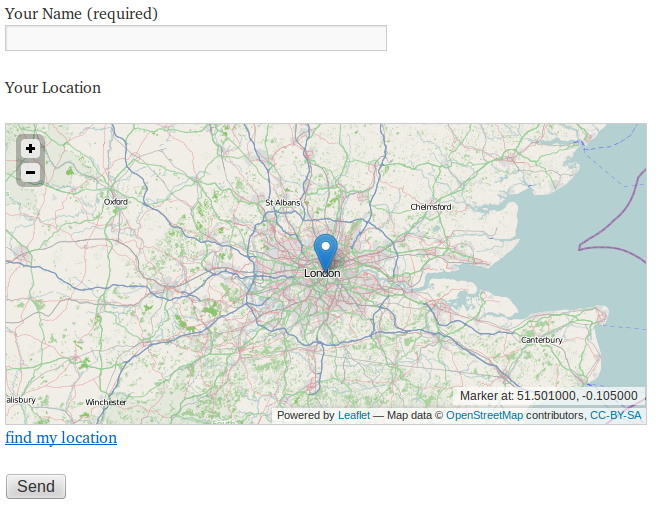
Example of a form with map (location) input field.
Installation
You MUST have Contact Form 7 installed!
Best way is to use WordPress’ built-in “Add New” installer:
- in WordPress admin bar go to Plugins.
- Press the “Add New”.
- search for “Contact Form 7 Map Field”.
- Press “Install Now”.
- Press “Activate Plugin”.
Or:
- Download the zip file.
- Extract the folder (contact-form-7-map-field) inside the zip to …wp-content/plugins/ directory of your WordPress installation.
- Activate the plugin from plugins page.
Now that the plugin is installed you can start using it:
- Edit a form in Contact Form 7.
- Choose “Map” from the Generate Tag dropdown.
- Follow the instructions on the page.
FAQ
- What map does it use by default?
-
The map data is provided by OpenStreetMap. and is powered by Leaflet.
- Can i use a different map provider?
-
I really recommend using Leaflet with OSM. But if you insist than you can, as long as you know some basic html, javascript and your map api.
- I like this plugin, how can i donate to it?
-
Simply go to the donate link.
Reviews
There are no reviews for this plugin.
Contributors & Developers
“Contact Form 7 Map Field” is open source software. The following people have contributed to this plugin.
Contributors
Translate “Contact Form 7 Map Field” into your language.
Interested in development?
Browse the code, check out the SVN repository, or subscribe to the development log by RSS.
Changelog
1.0
Initial plugin release.
1.1
Switched to work with Leaflet & OpenStreetMap.
1.3
Some code fixing and cleaning.
1.4
Fixed marker icon wrong path, collision with Leaflet Maps Marker plugin.
1.5
Better code structure.
2.0
Added geolocation, now the map and marker are focused on the supposed user location.
2.1
Bug fixes in geolocation.
2.2
Added validation.
2.3
Added minimum map zoom validation.