
Description
Post Category Filter allows you to filter through your post categories and custom taxonomies by adding a search box on top of the term lists. The lists will update live as you type with only the relevant results based on your search query.
Want to contribute?
You can follow the Github repository and submit issues or pull requests.
Screenshots
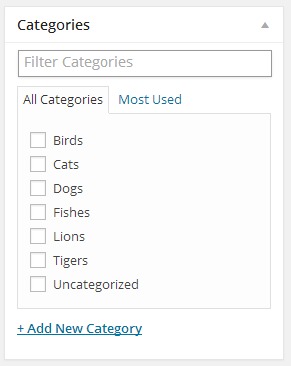
Regular filter view 
Filtered results
Installation
Using The WordPress Dashboard
- Navigate to the ‘Add New’ in the plugins dashboard
- Search for ‘Admin Category Filter’
- Click ‘Install Now’
- Activate the plugin on the Plugin dashboard
Uploading in WordPress Dashboard
- Navigate to the ‘Add New’ in the plugins dashboard
- Navigate to the ‘Upload’ area
- Select
admin-category-filter.zipfrom your computer - Click ‘Install Now’
- Activate the plugin in the Plugin dashboard
Using FTP
- Download
admin-category-filter.zip - Extract the
admin-category-filterdirectory to your computer - Upload the
admin-category-filterdirectory to the/wp-content/plugins/directory - Activate the plugin in the Plugin dashboard
FAQ
- Installation Instructions
-
Using The WordPress Dashboard
- Navigate to the ‘Add New’ in the plugins dashboard
- Search for ‘Admin Category Filter’
- Click ‘Install Now’
- Activate the plugin on the Plugin dashboard
Uploading in WordPress Dashboard
- Navigate to the ‘Add New’ in the plugins dashboard
- Navigate to the ‘Upload’ area
- Select
admin-category-filter.zipfrom your computer - Click ‘Install Now’
- Activate the plugin in the Plugin dashboard
Using FTP
- Download
admin-category-filter.zip - Extract the
admin-category-filterdirectory to your computer - Upload the
admin-category-filterdirectory to the/wp-content/plugins/directory - Activate the plugin in the Plugin dashboard
- Does it work with custom taxonomies?
-
Yes.
- Does it work with custom post types?
-
Yes.
Reviews

Setyembre 18, 2023
Still working is Wordpress 6.3.x
Amazing

Setyembre 21, 2019
This plugin works perfectly for filtering WooCommerce categories. I have over 120 product categories and this plugin now makes it very easy to find the right category to assign. Thanks!

Pebrero 12, 2019
This just saved my life... well... a lot of work and me hitting my head against a wall thinking why don't developers invent useful plugins..
Add a donate button and I'll gladly buy you a coffee...

Hulyo 30, 2018
I have more than 5 thousand categories. This plugin has helped me immensely.
Thank you!

Enero 29, 2018
I'm super impressed with this plugin. Simple and needed. Scrolling through a very long list of categories everytime is frustrating for our editors and journalists. This is exactly how I've imagined categories should work in admin.
Thanks!

Enero 18, 2018
Something that should be present in WP from the start. Nice, simple and friendly looking.
Contributors & Developers
“Post Category Filter” is open source software. The following people have contributed to this plugin.
Contributors
“Post Category Filter” has been translated into 4 locales. Thank you to the translators for their contributions.
Translate “Post Category Filter” into your language.
Interested in development?
Browse the code, check out the SVN repository, or subscribe to the development log by RSS.
Changelog
1.6.1
- Update for WordPress 4.9
1.6.0
- Replace search field placeholder with correct taxonomy name
1.5.1
- Update for WordPress 4.8
1.5.0
- Make sure filter is displayed in new posts screen
1.4.0
- Add filter functionality to quick edit section
1.3.0
- Change text domain to match plugin slug
1.2.10
- Update for WordPress 4.7
1.2.9
- Small fixes to translations functions
1.2.8
- Change translation strings to work with latest WordPress version
1.2.7
- Update for WordPress 4.6
1.2.6
- Update for WordPress 4.5
1.2.5
- Update for WordPress 4.4
1.2.4
- Update for WordPress 4.3
1.2.3
- Update for WordPress 4.2
1.2.2
- Update for WordPress 4.1
1.2.1
- Update for WordPress 4.0
1.2.0
- Simplify file structure
1.1.0
- Add support for custom post types
1.0.2
- Update readme
1.0.1
- Remove assets folder from plugin folder
1.0.0
- First version